Processing 1 Million Jobs a Day: Scaling Laravel Queues on Deploynix
One million jobs per day sounds like an extraordinary number until you break it down. It is roughly 11.5 jobs per second, sustained over 24 hours. A Laravel application with moderate traffic that sends emails, processes webhooks, syncs data with external services, updates search indexes, and generates notifications can reach this volume faster than you might expect.
At one million jobs per day, queue processing moves from a background concern to a core infrastructure challenge. The decisions you make about worker topology, job design, priority management, and monitoring determine whether your queue runs smoothly or becomes a bottleneck that cascades into user-facing failures.
This guide is for teams that have outgrown a single worker process and need to scale their Laravel queue infrastructure on Deploynix. We will cover the architecture, the optimizations, and the operational practices that make high-volume queue processing reliable.
Understanding the Throughput Math
Before scaling anything, understand your actual throughput requirements and constraints.
Jobs per second: 1,000,000 jobs / 86,400 seconds = ~11.6 jobs per second on average. But averages lie. If 70% of your jobs are dispatched during business hours (10 hours), your peak rate is closer to 19.4 jobs per second. Add a 3x peak-to-average ratio for traffic spikes, and you need to handle ~58 jobs per second.
Job execution time matters most. A worker processing a job that takes 100ms can handle 10 jobs per second. A worker processing a job that takes 2 seconds can handle 0.5 jobs per second. The number of workers you need is directly proportional to your average job execution time.
The formula:
Required workers = (Peak jobs per second) x (Average job duration in seconds)If your peak rate is 58 jobs/second and average job duration is 200ms:
Required workers = 58 x 0.2 = 11.6 → 12 workersTwelve worker processes can handle your peak load. That is well within the capacity of a single server. Even with longer job durations (500ms average), you need about 29 workers — still manageable on one or two servers.
The math shows that one million jobs per day is achievable without exotic infrastructure. The challenge is not raw throughput — it is reliability, monitoring, and graceful handling of edge cases.
Horizontal Scaling with Deploynix Worker Servers
When a single server's worker processes cannot keep up, Deploynix's Worker server type lets you scale horizontally.
Architecture
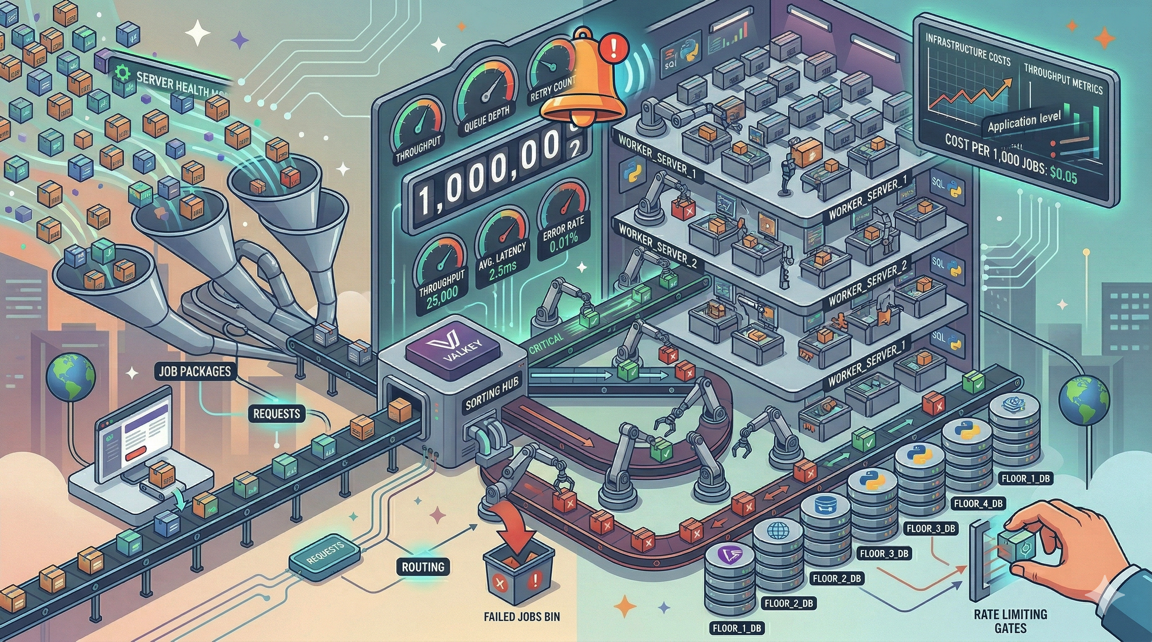
A horizontally scaled queue architecture on Deploynix looks like this:
Web servers (App or Web type): Handle HTTP requests and dispatch jobs to the queue.
Cache server (Cache type): Runs Valkey, serving as the shared queue backend.
Worker servers (Worker type): Process jobs from the shared Valkey queue.
Database server (Database type): Shared MySQL/MariaDB/PostgreSQL for application data.
All servers connect to the same Valkey instance, so jobs dispatched by web servers are immediately available to worker servers. Adding a worker server increases processing capacity linearly.
Provisioning Worker Servers
In the Deploynix dashboard:
Provision a new server with the Worker server type.
Select your cloud provider and region (same region as your web and database servers to minimize latency).
Choose an appropriate size — CPU-optimized instances are ideal for queue processing.
Deploy your application codebase.
Configure worker daemons.
A worker server does not run Nginx or serve web traffic. It runs your Laravel application solely for queue processing, reducing resource overhead.
How Many Worker Servers?
Start with one worker server and monitor. If the queue consistently has pending jobs during peak hours, add another. The cost of a worker server on most cloud providers (DigitalOcean, Vultr, Hetzner) is $12 to $48/month depending on specs.
For one million jobs per day with sub-second average execution time, one to two dedicated worker servers with 4 vCPUs each typically provide sufficient capacity with headroom for spikes.
Priority Tuning: Not All Jobs Are Equal
At high volume, priority management becomes critical. Without priorities, a bulk notification job that dispatches 100,000 notifications blocks payment processing jobs, webhook acknowledgments, and other time-sensitive operations.
Queue Architecture for High Volume
Design your queues around business priority, not job type:
# Critical: Must process within seconds
# Payment confirmations, webhook acknowledgments, authentication
php artisan queue:work redis --queue=critical --tries=5 --timeout=30

# High: Should process within minutes
# Transactional emails, inventory updates, search indexing
php artisan queue:work redis --queue=high --tries=3 --timeout=60

# Default: Process when possible
# Analytics, sync operations, non-urgent notifications
php artisan queue:work redis --queue=default --tries=3 --timeout=120

# Low: Process during off-peak
# Reports, bulk operations, cleanup tasks
php artisan queue:work redis --queue=low --tries=2 --timeout=300
Worker Allocation by Priority
Allocate more workers to higher-priority queues:
| Queue | Workers | Rationale | |-------|---------|-----------| | critical | 4 | Always available, fast processing | | high | 6 | Handles the bulk of time-sensitive work | | default | 4 | Steady processing of regular jobs | | low | 2 | Sufficient for non-urgent work |
On Deploynix, configure each priority as a separate daemon with the appropriate number of processes. This ensures critical jobs are never starved by lower-priority work.
Dynamic Priority Adjustment
During peak hours, you may want to shift workers from low-priority queues to high-priority ones. While Deploynix does not dynamically rebalance workers, you can achieve this by adjusting daemon configurations during known peak periods or by using Laravel Horizon's auto-balancing feature.
Job Batching: Efficiency at Scale
Processing one million individual jobs is less efficient than processing the same work in batches. Laravel's job batching feature lets you group related jobs and track their collective progress.
When to Batch
Data synchronization. Instead of dispatching one job per record to sync with an external API, batch records into groups of 100 and dispatch batch jobs. This reduces queue overhead and often aligns better with external API batch endpoints.
use Illuminate\Bus\Batch;
use Illuminate\Support\Facades\Bus;

$chunks = $records->chunk(100);

$jobs = $chunks->map(fn ($chunk) => new SyncRecordBatch($chunk));

Bus::batch($jobs->toArray())
    ->name('daily-sync')
    ->allowFailures()
    ->onQueue('default')
    ->dispatch();
Email campaigns. A marketing email to 50,000 users should not dispatch 50,000 individual jobs. Batch them into groups of 100, reducing queue pressure from 50,000 jobs to 500.
Report generation. Break large reports into parallelizable segments. A monthly financial report can be split by week or category, processed in parallel as a batch, and assembled when all segments complete.
Batch Monitoring
Laravel tracks batch progress in the job_batches table. You can monitor completion percentage, failure count, and cancellation status. At high volume, clean up completed batches regularly:
Schedule::command('queue:prune-batches --hours=48')->daily();Rate Limiting: Playing Nice with External Services
At one million jobs per day, you will almost certainly hit rate limits on external services: email providers, payment APIs, search indexes, third-party integrations.
Redis-Based Rate Limiting
Use Laravel's rate limiter with the Redis backend for distributed rate limiting across multiple worker servers:
use Illuminate\Support\Facades\RateLimiter;

class SendTransactionalEmail implements ShouldQueue
{
    public $tries = 5;

    public function handle(): void
    {
        $executed = RateLimiter::attempt(
            key: 'email-api',
            maxAttempts: 100,
            callback: fn () => $this->sendEmail(),
            decaySeconds: 60,
        );

        if (! $executed) {
            $this->release(30); // Release back to queue, retry in 30 seconds
        }
    }
}
This limits email API calls to 100 per minute across all workers. Jobs that exceed the limit are released back to the queue with a 30-second delay.
Throttled Queues with Middleware
For more sophisticated throttling, use Laravel's queue middleware:
use Illuminate\Queue\Middleware\ThrottlesExceptions;

class CallExternalApi implements ShouldQueue
{
    public function middleware(): array
    {
        return [
            new ThrottlesExceptions(maxAttempts: 10, decayMinutes: 5),
        ];
    }
}
This throttles the job if it throws exceptions, implementing circuit-breaker-like behavior. After 10 failures within 5 minutes, the job stops retrying, preventing a failing external service from consuming worker capacity.
Per-Service Rate Limits
Different external services have different rate limits. Map your queue architecture to these limits:
| Service | Rate Limit | Queue Strategy | |---------|-----------|----------------| | Email API (Postmark, SES) | 100/second | Dedicated queue, 2 workers | | Payment API (Stripe) | 100/second | Critical queue, rate-limited | | Search API (Algolia, Meilisearch) | 10,000/minute | Batched updates, default queue | | Webhook delivery | Your limit | Throttled with backoff |
Monitoring Throughput
At one million jobs per day, you need visibility into queue health. Here is what to monitor and how.
Queue Size Over Time
A growing queue means jobs are dispatched faster than they are processed. This is normal during traffic spikes but problematic if sustained.
Schedule::call(function () {
    $metrics = [
        'critical' => Queue::size('critical'),
        'high' => Queue::size('high'),
        'default' => Queue::size('default'),
        'low' => Queue::size('low'),
    ];

    // Log metrics, send to monitoring service
    Log::info('Queue sizes', $metrics);

    if ($metrics['critical'] > 50) {
        // Alert: critical queue is backing up
    }
})->everyMinute();
Job Processing Rate
Track how many jobs are processed per minute to detect throughput degradation:
// In a custom Artisan command run by scheduler
$processed = Cache::increment('jobs_processed_' . now()->format('Y-m-d-H-i'));
Increment this counter in your job's handle() method (or in a base job class) to track actual throughput.
Failed Job Rate
A spike in failed jobs often indicates an external service outage or a bug introduced by a recent deployment. Monitor the failure rate:
Schedule::call(function () {
    $recentFailures = DB::table('failed_jobs')
        ->where('failed_at', '>=', now()->subMinutes(5))
        ->count();

    if ($recentFailures > 10) {
        // Alert: elevated failure rate
    }
})->everyFiveMinutes();
Worker Memory Usage
Long-running workers can leak memory. Monitor worker memory and configure --memory=128 to restart workers that exceed a memory threshold:
php artisan queue:work redis --queue=default --memory=128When a worker exceeds 128MB of memory usage, it finishes the current job and gracefully restarts. On Deploynix, daemon monitoring ensures the worker is restarted immediately.
Cost Analysis: What Does One Million Jobs Per Day Actually Cost?
Let us calculate the infrastructure cost for processing one million jobs daily on Deploynix.
Infrastructure Costs
| Component | Provider | Specs | Monthly Cost | |-----------|----------|-------|-------------| | Web server | Hetzner | 2 vCPU, 8GB | ~$12 | | Worker server | Hetzner | 2 vCPU, 8GB | ~$12 | | Database server | Hetzner | 2 vCPU, 4GB | ~$7 | | Total infrastructure | | | ~$31 |
Add Deploynix's subscription for server management, and your total cost for infrastructure capable of processing one million jobs per day is remarkably low — likely under $60/month.
Comparison with Managed Queue Services
For context, AWS SQS charges $0.40 per million requests. One million jobs per day means approximately 30 million requests per month (dispatching + processing + polling). That is $12/month for SQS alone, before counting Lambda execution costs for processing, CloudWatch for monitoring, and the engineering time to set up the Lambda-SQS integration.
Running your own queue infrastructure on Deploynix is cost-competitive with managed services while giving you full control over worker behavior, retry logic, and priority management.
Optimization Techniques for High Throughput
Reduce Job Payload Size
Every job payload is serialized, stored in Valkey, transferred to a worker, and deserialized. Smaller payloads mean faster operations at every step.
Instead of passing entire Eloquent models in job payloads, pass only the ID and load the model in the worker:
// Avoid: serializes the entire model
class ProcessOrder implements ShouldQueue
{
    public function __construct(public Order $order) {}
}

// Better: serializes only the ID
class ProcessOrder implements ShouldQueue
{
    public function __construct(public int $orderId) {}

    public function handle(): void
    {
        $order = Order::findOrFail($this->orderId);
        // Process...
    }
}
Laravel automatically serializes Eloquent models by ID (via the SerializesModels trait), but being explicit about what data your job needs keeps payloads predictable.
Avoid N+1 Queries in Jobs
A job that processes a batch of records should eager-load relationships:
public function handle(): void
{
    $orders = Order::with(['items', 'customer', 'payments'])
        ->whereIn('id', $this->orderIds)
        ->get();

    foreach ($orders as $order) {
        // Process with pre-loaded relationships
    }
}
At one million jobs per day, even small inefficiencies in individual jobs compound into significant database load.
Use Job Middleware
Job middleware reduces boilerplate across high-volume jobs:
use Illuminate\Queue\Middleware\WithoutOverlapping;

class UpdateInventory implements ShouldQueue
{
    public function middleware(): array
    {
        return [
            new WithoutOverlapping($this->productId),
        ];
    }
}
WithoutOverlapping prevents concurrent execution of jobs with the same key, eliminating race conditions without complex locking logic in your job code.
Connection Pooling
At high worker counts, database connection management becomes important. Each worker process maintains its own database connection. Twenty workers across two servers means 40 concurrent database connections.
Monitor your database's connection count and adjust max_connections if needed. On Deploynix, you can adjust MySQL configuration through the web terminal or contact support for guidance on optimal settings for your workload.
Scaling Beyond One Million
At some point, one million jobs per day is not enough. The architecture we have described scales linearly:
Add worker servers. Each additional worker server provides proportionally more processing capacity.
Shard queues. Use separate Valkey instances for different queue priorities, distributing the load.
Optimize job duration. A 10% reduction in average job execution time is equivalent to adding 10% more workers.
Batch more aggressively. Processing 1,000 records per job instead of 100 reduces queue overhead by 10x.
Deploynix supports this scaling journey from a single server processing a few hundred jobs per day to a multi-server architecture processing millions. The platform handles server provisioning, daemon management, deployment coordination, and monitoring at every scale.
The Bottom Line
Processing one million jobs per day on Laravel is not a heroic infrastructure feat. It is an engineering problem with well-understood solutions: right-sized workers, priority-based queues, rate limiting for external services, job batching for efficiency, and monitoring for reliability.
On Deploynix, the infrastructure pieces — worker servers, Valkey, daemon management, and deployment — are handled by the platform. Your job is to design your queue architecture, optimize your job code, and monitor throughput.