Wildcard Subdomains for Multi-Tenant Laravel Apps on Deploynix
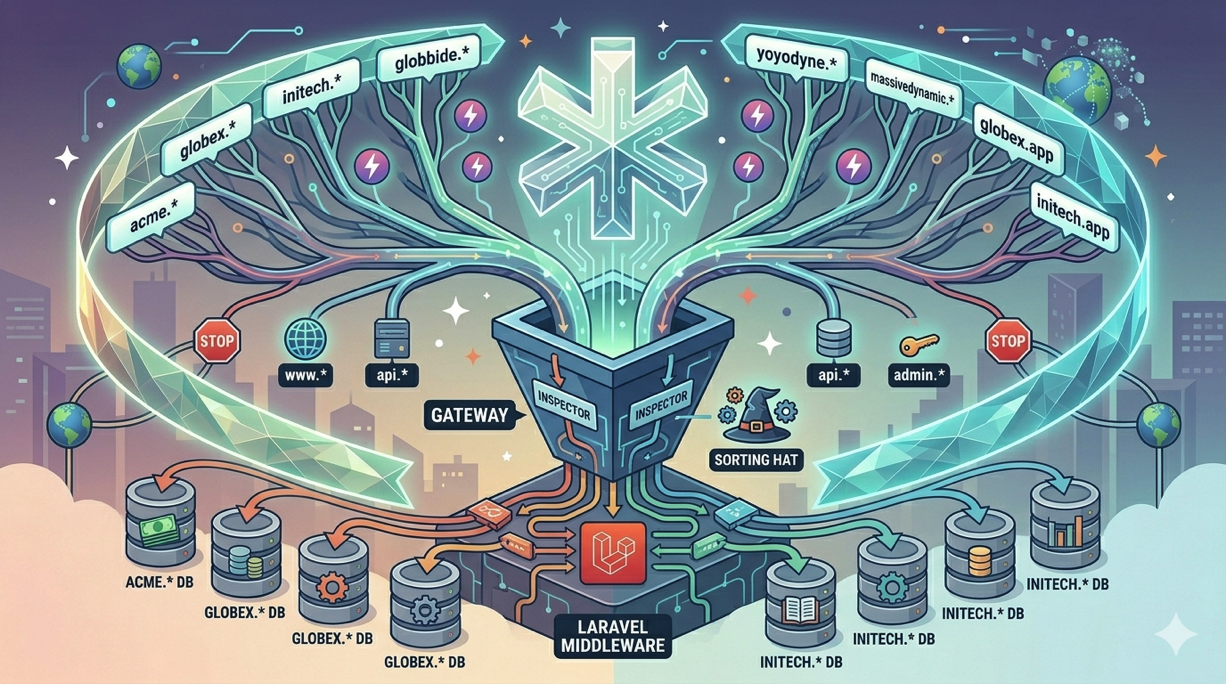
Multi-tenant SaaS applications often give each customer their own subdomain: acme.yourapp.com, globex.yourapp.com, initech.yourapp.com. This pattern provides a clean separation of concerns, a professional appearance for each tenant, and a natural way to identify which tenant a request belongs to.
Implementing wildcard subdomains involves coordination between your DNS provider, your web server, your SSL certificates, and your Laravel application. Each layer needs to be configured correctly, and a misconfiguration at any layer breaks the entire flow. This guide covers every step of setting up wildcard subdomains for a multi-tenant Laravel application deployed on Deploynix.
How Wildcard Subdomains Work
A wildcard DNS record catches all subdomains that do not have their own explicit DNS record. When you create an A record for *.yourapp.com, any request to anything.yourapp.com will resolve to your server's IP address. Your web server then receives the request and passes it to your application, which inspects the subdomain to determine which tenant's data to load.
The flow looks like this:
User visits
acme.yourapp.comDNS resolves
*.yourapp.comto your server's IPNginx receives the request and routes it to your Laravel application
Laravel extracts
acmefrom the hostnameYour application loads the Acme tenant's data and renders the response
Each step requires specific configuration. Let's walk through them.
Step 1: Configure Wildcard DNS
Log in to your DNS provider and create a wildcard A record:
| Type | Name | Value | TTL | |------|------|-------|-----| | A | * | 123.45.67.89 | 300 |
Replace the IP address with your Deploynix server's public IPv4 address.
You should also have an A record for the root domain if your marketing site or main application lives there:
| Type | Name | Value | TTL | |------|------|-------|-----| | A | @ | 123.45.67.89 | 300 | | A | * | 123.45.67.89 | 300 |
The wildcard record does not override explicit records. If you have a specific A record for api.yourapp.com pointing to a different server, that takes precedence over the wildcard. This is useful when certain subdomains need different handling.
DNS Provider Considerations
Deploynix integrates with several DNS providers for automated certificate management: Cloudflare, DigitalOcean, AWS Route 53, and Vultr. If your DNS is hosted with one of these providers, you will benefit from automated DNS challenge verification for wildcard SSL certificates, which we will cover shortly.
If you use Cloudflare, remember that the proxy feature (orange cloud) applies to the wildcard record. When enabled, all subdomain traffic routes through Cloudflare's network. This provides DDoS protection but may need to be temporarily disabled for SSL certificate provisioning.
Step 2: Configure Nginx for Wildcard Subdomains
Your Nginx server block needs to accept requests for any subdomain. In the Deploynix site configuration, set the domain to accept wildcard subdomains.
When you add your site in Deploynix, configure it with *.yourapp.com as the domain. Deploynix will generate an Nginx server block with a server_name directive that matches any subdomain:
server_name *.yourapp.com yourapp.com;This tells Nginx to route requests for any subdomain of yourapp.com, as well as the root domain itself, to this site's configuration.
If you need to customize the Nginx configuration further, Deploynix allows you to edit the Nginx site configuration through the dashboard or via the web terminal. For most multi-tenant applications, the default configuration works without modification.
Step 3: Provision a Wildcard SSL Certificate
HTTPS is non-negotiable for production applications. A wildcard SSL certificate covers *.yourapp.com, meaning acme.yourapp.com, globex.yourapp.com, and any other subdomain are all covered by a single certificate.
Wildcard certificates cannot be provisioned using the standard HTTP challenge. They require DNS challenge verification, where the certificate authority verifies domain ownership by checking for a specific TXT record in your DNS.
Deploynix supports automated DNS challenge verification through its integrated DNS providers: Cloudflare, DigitalOcean, AWS Route 53, and Vultr. If your DNS is managed by one of these providers, the process is straightforward:
Navigate to your site's SSL settings in the Deploynix dashboard
Select "Wildcard certificate" for
*.yourapp.comChoose your DNS provider and enter the API credentials
Deploynix automatically creates the DNS TXT record, verifies ownership, provisions the certificate, and cleans up the TXT record
The certificate covers both *.yourapp.com and yourapp.com, so both the root domain and all subdomains are secured.
Deploynix also handles automatic certificate renewal. Wildcard certificates from Let's Encrypt are valid for 90 days, and Deploynix renews them automatically before they expire.
Step 4: Laravel Route Configuration
With DNS, Nginx, and SSL handling the infrastructure, your Laravel application needs to route requests based on the subdomain.
Subdomain Routing
Laravel's router natively supports subdomain routing. In your routes/web.php:
Route::domain('{tenant}.yourapp.com')->group(function () {
    Route::get('/', [TenantDashboardController::class, 'index']);
    Route::get('/settings', [TenantSettingsController::class, 'index']);
    // ... tenant-specific routes
});

// Routes for the main domain (marketing site, login, etc.)
Route::domain('yourapp.com')->group(function () {
    Route::get('/', [MarketingController::class, 'index']);
    Route::get('/login', [AuthController::class, 'showLogin']);
    Route::get('/register', [AuthController::class, 'showRegister']);
});
The {tenant} parameter is automatically captured and passed to your controllers:
class TenantDashboardController extends Controller
{
    public function index(string $tenant): View
    {
        $organization = Organization::where('slug', $tenant)->firstOrFail();

        return view('tenant.dashboard', [
            'organization' => $organization,
        ]);
    }
}
Middleware for Tenant Resolution
For a cleaner approach, create middleware that resolves the tenant from the subdomain and makes it available throughout the request lifecycle:
class ResolveTenant
{
    public function handle(Request $request, Closure $next): Response
    {
        $host = $request->getHost();
        $subdomain = explode('.', $host)[0];

        $tenant = Organization::where('slug', $subdomain)->first();

        if (! $tenant) {
            abort(404, 'Organization not found.');
        }

        app()->instance('current_tenant', $tenant);
        $request->merge(['tenant' => $tenant]);

        return $next($request);
    }
}
Register this middleware in bootstrap/app.php and apply it to your tenant route group:
Route::domain('{tenant}.yourapp.com')
    ->middleware('resolve-tenant')
    ->group(function () {
        // All routes here have the tenant resolved
    });
Environment Configuration
Update your APP_URL to reflect your root domain:
APP_URL=https://yourapp.comFor URL generation in tenant contexts, you may need to dynamically set the URL. Use a service provider or middleware to adjust the URL based on the current tenant:
if ($tenant = app('current_tenant')) {
    config(['app.url' => "https://{$tenant->slug}.yourapp.com"]);
    URL::forceRootUrl(config('app.url'));
}
Step 5: Database Strategy for Multi-Tenancy
There are three common approaches to multi-tenant database architecture. The right choice depends on your scale, isolation requirements, and operational complexity tolerance.
Single Database with Tenant Column
The simplest approach. All tenants share the same database, and every table includes a tenant_id or organization_id column. Queries are scoped using global scopes or explicit where clauses.
class Project extends Model
{
    protected static function booted(): void
    {
        static::addGlobalScope('tenant', function (Builder $builder) {
            if ($tenant = app('current_tenant')) {
                $builder->where('organization_id', $tenant->id);
            }
        });
    }
}
This approach works well for most SaaS applications and is the easiest to deploy on Deploynix. A single database server handles everything.
Database Per Tenant
Each tenant gets their own database. This provides stronger data isolation but adds operational complexity. You need to manage database creation when new tenants sign up and run migrations across all tenant databases during deployments.
With Deploynix, you can provision a dedicated Database server (MySQL, MariaDB, or PostgreSQL) and create tenant databases on it. Your deploy script needs to loop through all tenant databases and run migrations on each.
Schema Per Tenant (PostgreSQL)
PostgreSQL supports schemas within a single database. Each tenant gets their own schema, providing isolation without the overhead of separate databases. This approach is PostgreSQL-specific and not available with MySQL or MariaDB.
Step 6: Handling Reserved Subdomains
Not every subdomain should map to a tenant. Reserve subdomains for system purposes:
class ResolveTenant
{
    protected array $reserved = [
        'www', 'api', 'admin', 'mail', 'smtp',
        'ftp', 'staging', 'dev', 'app', 'dashboard',
        'status', 'blog', 'docs', 'support',
    ];

    public function handle(Request $request, Closure $next): Response
    {
        $subdomain = explode('.', $request->getHost())[0];

        if (in_array($subdomain, $this->reserved)) {
            abort(404);
        }

        // ... resolve tenant
    }
}
Also validate against reserved subdomains when tenants choose their subdomain during registration:
'subdomain' => [
    'required',
    'string',
    'alpha_dash',
    'min:3',
    'max:63',
    Rule::notIn($this->reserved),
    Rule::unique('organizations', 'slug'),
],
Step 7: Custom Domains Per Tenant
As your multi-tenant application grows, tenants may want their own custom domains (for example, app.acmecorp.com) in addition to their subdomain (acme.yourapp.com).
Store custom domain mappings in your database:
class Organization extends Model
{
    public function customDomains(): HasMany
    {
        return $this->hasMany(CustomDomain::class);
    }
}
Update your tenant resolution middleware to check custom domains:
$host = $request->getHost();

// First, check if it's a custom domain
$customDomain = CustomDomain::where('domain', $host)->first();
if ($customDomain) {
    $tenant = $customDomain->organization;
} else {
    // Fall back to subdomain resolution
    $subdomain = explode('.', $host)[0];
    $tenant = Organization::where('slug', $subdomain)->first();
}
For custom domains, each tenant needs to point their domain to your server via an A record or CNAME, and you need to provision an individual SSL certificate for each custom domain. Deploynix handles individual SSL certificate provisioning automatically when you add the domain to your site configuration.
Testing Your Multi-Tenant Setup
Before going live, verify the complete flow:
# Verify wildcard DNS resolves
dig test-tenant.yourapp.com A +short
# Should return your server's IP

# Verify SSL covers the wildcard
echo | openssl s_client -connect test-tenant.yourapp.com:443 \
  -servername test-tenant.yourapp.com 2>/dev/null | \
  openssl x509 -noout -text | grep "DNS:"
# Should show *.yourapp.com in the SAN list

# Verify the application resolves the tenant
curl -s https://acme.yourapp.com | head -20
# Should show the Acme tenant's content

# Verify a non-existent tenant returns 404
curl -s -o /dev/null -w "%{http_code}" https://nonexistent.yourapp.com
# Should return 404
Write automated tests for tenant resolution. Using Pest:
it('resolves tenant from subdomain', function () {
    $org = Organization::factory()->create(['slug' => 'acme']);

    $this->get('http://acme.yourapp.com/')
        ->assertOk();
});

it('returns 404 for unknown tenant', function () {
    $this->get('http://unknown.yourapp.com/')
        ->assertNotFound();
});

it('blocks reserved subdomains', function () {
    $this->get('http://admin.yourapp.com/')
        ->assertNotFound();
});
Conclusion
Wildcard subdomains give multi-tenant Laravel applications a polished, professional feel while providing a clean mechanism for tenant identification. The setup requires coordination across four layers, DNS, Nginx, SSL, and Laravel, but each layer has a well-defined role and configuration.
Deploynix simplifies the infrastructure side significantly. Wildcard DNS records point all subdomains to your server, Deploynix configures Nginx to accept them, and automated wildcard SSL provisioning through integrated DNS providers ensures every tenant's subdomain is secured with HTTPS. On the Laravel side, subdomain routing and tenant resolution middleware complete the picture.
Start with a single-database approach and subdomain-only tenancy. As your application grows, add custom domain support for premium tenants and consider database-per-tenant isolation if your use case demands it. The infrastructure you build today on Deploynix scales naturally as your tenant base grows.