Using Docker in Development but Deploynix in Production: The Best of Both Worlds
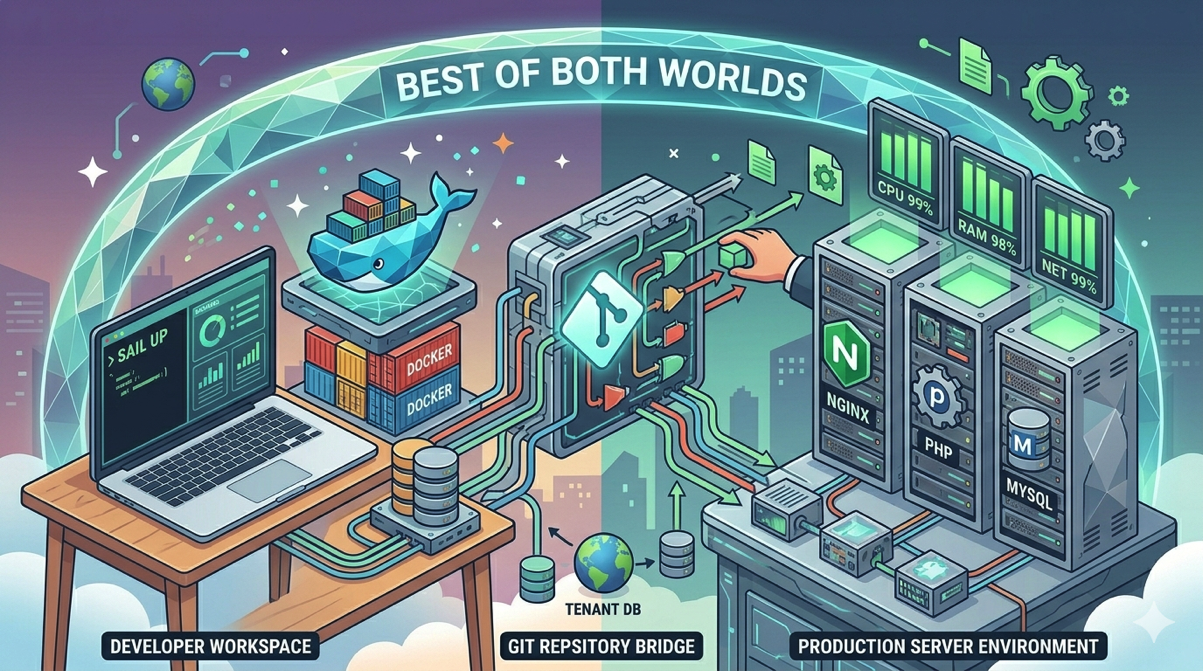
The containerization debate in the Laravel community tends to be all-or-nothing. Either you go full Docker everywhere, including production, or you avoid containers entirely. But there is a pragmatic middle ground that gives you the best of both worlds: use Docker (specifically Laravel Sail) for local development, and deploy to Deploynix-managed bare-metal servers in production.
This hybrid approach gives developers a consistent, easy-to-set-up local environment while keeping production infrastructure simple, performant, and free from container orchestration complexity. It is the approach used by thousands of Laravel teams, and for good reason.
The Case for Docker in Development
Local development environments have always been a pain point. "It works on my machine" is a meme for a reason. Different developers have different PHP versions, different database engines, different system configurations. Setting up a new developer's machine can take hours of debugging dependency conflicts.
Docker solves this by packaging everything your application needs into isolated containers. When a new developer joins the team, they run one command and have a fully working development environment with the correct PHP version, database engine, cache server, and any other services the application requires.
Laravel Sail: Docker Made Easy
Laravel Sail is the official Docker development environment for Laravel. It provides a lightweight command-line interface for interacting with Docker containers tailored to Laravel applications.
A typical Sail setup includes containers for:
PHP and the application server with the correct PHP version and extensions
MySQL, MariaDB, or PostgreSQL for the database
Redis or Valkey for caching and queues
Meilisearch for full-text search (if used)
Mailpit for email testing
Node.js for frontend asset compilation
Starting the environment is a single command:
./vendor/bin/sail upEvery developer on your team, regardless of their operating system, gets the same environment. No more spending half a day installing PHP extensions, configuring MySQL, or debugging why Redis will not start.
Why Docker Works Well for Development
Consistency. Every developer runs the exact same stack. The PHP version, the database version, the cache server, the extensions installed, everything is defined in the docker-compose.yml file and shared through version control.
Isolation. Your project's services do not conflict with other projects on your machine. You can work on one project using MySQL 8 and another using PostgreSQL 16 without either interfering with the other.
Onboarding speed. New team members clone the repository, run sail up, and have a working environment in minutes instead of hours.
Parity with services. Your local database engine, cache server, and search engine match what you will use in production. This catches compatibility issues early.
The Case Against Docker in Production
If Docker is so great for development, why not use it in production too? For small to medium teams running Laravel applications, container orchestration in production introduces complexity that often outweighs the benefits.
Operational Overhead
Running Docker in production means managing container orchestration. Whether you use Docker Compose, Docker Swarm, or Kubernetes, you are adding a layer of infrastructure that needs to be understood, maintained, and debugged.
Kubernetes is powerful but notoriously complex. Even Docker Compose in production requires careful consideration of networking, volume persistence, log aggregation, secret management, and health checks. For a team whose core competency is building a Laravel application, not managing container infrastructure, this is a distraction.
Performance Considerations
Containers add a small but measurable layer of overhead. Network traffic between containers passes through Docker's virtual network. File system operations on mounted volumes, especially on macOS, can be significantly slower than native file system access. While these performance differences are negligible in development, they matter in production where every millisecond counts.
Bare-metal (or dedicated VM) deployments eliminate this overhead. PHP-FPM, Nginx, and your database run directly on the host operating system with native file system access and native networking.
Debugging Complexity
When something goes wrong in production, you want the simplest possible debugging path. On a bare-metal server, you SSH in (or use the Deploynix web terminal), check logs, inspect processes, and fix the issue. With containerized production, you need to navigate container logs, exec into running containers, and deal with ephemeral file systems that lose data on restart.
Resource Efficiency
Containers share the host kernel but each container includes its own user space, libraries, and runtime dependencies. On a server running multiple containers for a single Laravel application (app, database, cache, worker, scheduler), the cumulative overhead is meaningful. A bare-metal deployment puts all those resources toward actually serving your application.
How the Hybrid Approach Works
The hybrid approach is simpler than it sounds because your deployment process does not change based on your local development environment.
The Development Workflow
Developer clones the repository
Developer runs
sail upto start the Docker environmentDeveloper writes code, runs tests, iterates
Developer commits and pushes to the git repository
At no point does Docker leave the developer's machine. The git repository contains your application code, not container images. Docker is purely a convenience for running services locally.
The Deployment Workflow
Code is pushed to GitHub, GitLab, or Bitbucket
Deploynix detects the push (or you trigger a manual deployment)
Deploynix pulls the latest code to the production server
Deployment hooks run:
composer install,npm run build, migrations, cache clearingDeploynix switches the symlink to the new release (zero-downtime deployment)
The application runs on Nginx and PHP-FPM directly on the server
There is no Docker build step, no container registry, no image tagging, no orchestration. Your deployment is a simple git pull followed by standard Laravel deployment commands.
What About Environment Differences?
The key question with any hybrid approach is: will things that work in development break in production? The answer is rarely, if you are disciplined about a few things.
Match PHP versions. If your Sail docker-compose.yml specifies PHP 8.4, provision your Deploynix server with PHP 8.4.
Match database engines. If Sail runs MySQL 8, your Deploynix database server should run MySQL 8. Do not develop against MySQL and deploy to PostgreSQL, or vice versa.
Match cache engines. If Sail runs Valkey for caching and queues, configure Deploynix with a Cache server running Valkey.
Use the same file paths. Avoid hardcoding absolute paths that differ between Docker and bare-metal. Use Laravel's path helpers (storage_path(), base_path(), public_path()) consistently.
Test with the right database in CI. Your CI pipeline should test against the same database engine as production. If you are using SQLite for tests, be aware of SQL dialect differences. For critical database interactions, test against MySQL in CI even if you use SQLite for speed in local development.
Setting Up the Hybrid Stack
Local Development with Sail
Your docker-compose.yml defines the local environment. Here is a typical setup for a Laravel application deployed on Deploynix:
services:
    laravel.test:
        build:
            context: ./vendor/laravel/sail/runtimes/8.4
        ports:
            - '${APP_PORT:-80}:80'
        depends_on:
            - mysql
            - valkey
    mysql:
        image: 'mysql/mysql-server:8.0'
        ports:
            - '${FORWARD_DB_PORT:-3306}:3306'
    valkey:
        image: 'valkey/valkey:8'
        ports:
            - '${FORWARD_REDIS_PORT:-6379}:6379'
Production on Deploynix
Provision your Deploynix infrastructure to match:
App Server — PHP 8.4, Nginx, your Laravel application. If you are using Laravel Octane, configure the appropriate driver (FrankenPHP, Swoole, or RoadRunner).
Database Server (optional, can run on the app server) — MySQL 8 to match your Sail configuration.
Cache Server (optional, can run on the app server) — Valkey for caching and queues.
Worker Server (optional) — For queue processing if your application uses background jobs extensively.
Deployment Configuration
Connect your Deploynix site to your git provider (GitHub, GitLab, Bitbucket, or custom). Configure the deployment branch and hooks:
Build steps:
composer install --no-dev --optimize-autoloader
npm ci && npm run build
Activation steps:
php artisan migrate --force
php artisan config:cache
php artisan route:cache
php artisan view:cache
php artisan queue:restart
These are standard Laravel deployment commands that work identically whether the code was developed in Docker, a local PHP installation, or a cloud IDE.
Handling Edge Cases
PHP Extensions
Docker makes it easy to install PHP extensions by adding them to the Dockerfile. On a Deploynix server, PHP extensions are installed via the system package manager. Make sure any extension your application requires is available on both.
Common extensions like pdo_mysql, mbstring, xml, curl, and gd are pre-installed on Deploynix servers. If you need additional extensions, you can install them via the web terminal.
File Storage
In development, Sail mounts your application directory into the container. File uploads go to the local storage directory. In production, files go to the server's file system.
For production applications, consider using a cloud storage driver (S3, DigitalOcean Spaces) for uploaded files. This decouples file storage from your server and makes it easier to scale to multiple app servers later. Laravel's Storage facade makes switching between local and cloud storage a one-line configuration change.
Cron Jobs and Daemons
In development, Sail handles running the Laravel scheduler and queue workers. In production, Deploynix manages cron jobs and daemons (long-running processes supervised by Supervisor).
Configure your Laravel scheduler as a cron job in the Deploynix dashboard. Set up queue workers as daemons that Deploynix will monitor and restart automatically if they fail.
SSL Certificates
Local development typically runs over HTTP on localhost. Production requires HTTPS. Deploynix handles SSL certificate provisioning automatically, but make sure your application is configured to generate HTTPS URLs in production by setting APP_URL to start with https://.
Why This Approach Wins
The hybrid approach is not a compromise. It genuinely gives you the best of both worlds.
Developer experience is maximized by Docker. One command to set up, consistent environments across the team, isolated services that do not interfere with other projects.
Production performance is maximized by bare-metal. No container overhead, native file system access, direct process management, and the simplest possible debugging experience.
Operational complexity is minimized. You do not need to learn Kubernetes, manage a container registry, or build CI/CD pipelines that produce Docker images. Your deployment is git push and a handful of familiar Artisan commands.
Cost is optimized. A single Deploynix-managed server runs your entire production application without the overhead of container orchestration services. Deploynix itself offers a Free tier to get started, and even the Starter tier is more cost-effective than managed container platforms.
Scaling remains straightforward. When you need to scale, Deploynix lets you provision additional App servers behind a load balancer, add dedicated Database and Cache servers, or spin up Worker servers for queue processing. No containers required.
Common Objections Addressed
"But Docker guarantees environment parity." It does, and that is valuable. But matching PHP version, database engine, and cache server between Sail and Deploynix provides sufficient parity for the vast majority of applications. The edge cases where Docker's byte-for-byte environment matching matters are rare in Laravel development.
"What about reproducible builds?" Your composer.lock and package-lock.json (or npm lockfile) ensure reproducible builds. composer install on your Deploynix server installs the exact same package versions as on your local machine.
"We might move to Kubernetes someday." Maybe. But building for Kubernetes today when a single server handles your load is premature optimization at the infrastructure level. When you genuinely need Kubernetes, you can containerize then. Building your application with clean separation of concerns (environment variables for config, cloud storage for files, stateless request handling) means containerizing later is straightforward.
Conclusion
The Docker-in-development, Deploynix-in-production approach is pragmatic engineering at its best. Use the right tool for each context. Docker and Laravel Sail provide an unmatched local development experience, while Deploynix provides simple, performant, well-managed production infrastructure.
Your application code does not know or care whether it runs in a Docker container or directly on a server. It just needs the right PHP version, the right database, and the right configuration. By matching these fundamentals between your Sail environment and your Deploynix server, you get consistency where it matters and simplicity everywhere else. Ship fast, run lean, and save the container orchestration for when you actually need it.