The True Cost of Managing Your Own Servers vs. Using a Deployment Platform
The argument for managing your own servers usually starts with a spreadsheet. A VPS costs $20/month. A deployment platform adds $10-30/month on top of that. "I can SSH into a server and run commands," you think. "Why would I pay extra for something I can do myself?"
This analysis is accurate as far as it goes. But it only accounts for the direct cost of the platform subscription. It ignores the dramatically larger cost: your time. And not just any time — your most expensive, most productive, highest-opportunity-cost time as a developer or engineering lead.
This article calculates the true cost of DIY server management by cataloging every recurring task, incident, and operational burden that comes with running production servers. We will put real time estimates on each task and convert them to dollars. The numbers might change your mind about what "expensive" means.
The Visible Costs
Let us start with what shows up on invoices.
DIY Approach
VPS hosting: $20-100/month depending on specs
Domain and DNS: $10-15/year
SSL certificate: Free (Let's Encrypt) but requires setup and renewal automation
Monitoring service: $0 (basic) to $30+/month (Datadog, New Relic)
Backup storage: $5-20/month (S3, Spaces)
Error tracking: $0 (basic) to $26+/month (Sentry, Bugsnag)
Total visible cost: $25-170/month
Platform Approach (Deploynix + VPS)
VPS hosting: $20-100/month (same providers — DigitalOcean, Vultr, Hetzner, Linode, AWS)
Deploynix subscription: Varies by plan (Free, Starter, Professional, Enterprise)
Domain and DNS: $10-15/year
Total visible cost: $20-130+/month
Looking at invoices alone, the costs are comparable. The platform approach may even be slightly more expensive. But invoices capture maybe 20% of the true cost.
The Hidden Time Costs
Here is where the real calculation happens. Every hour you spend on server management is an hour you are not building features, fixing bugs, or growing your business. For a solo developer or small team, this is your most constrained resource.
We will use a conservative rate of $75/hour for developer time. If you are a senior developer, consultant, or founder, the real opportunity cost is likely $100-200/hour.
Initial Server Setup (One-Time, Per Server)
DIY time investment:
Task | Time |
|---|---|
Provision VPS and initial SSH setup | 30 min |
Harden SSH (disable password auth, change port, configure keys) | 30 min |
Install and configure Nginx | 45 min |
Install and configure PHP + required extensions | 45 min |
Install and configure MySQL/PostgreSQL | 45 min |
Install and configure Valkey/Redis | 20 min |
Configure firewall (UFW/iptables) | 30 min |
Set up SSL certificates (Certbot + auto-renewal) | 30 min |
Configure deployment workflow (git hooks, scripts, or CI/CD) | 2-4 hours |
Set up log rotation | 15 min |
Configure automated backups | 1-2 hours |
Set up basic monitoring | 1-2 hours |
Total | 8-12 hours |
Cost at $75/hour: $600-900 per server
Deploynix time investment:
Task | Time |
|---|---|
Connect cloud provider | 2 min |
Provision server (select type, region, size) | 5 min |
Wait for provisioning | 5-10 min |
Add site and configure domain | 5 min |
Set environment variables | 10 min |
First deployment | 5 min |
Total | 30-40 minutes |
Cost at $75/hour: $37-50 per server
Difference: $550-850 saved per server on initial setup alone.
Ongoing Monthly Maintenance
These are the tasks that eat your time month after month, year after year.
Security Updates
Your server runs an operating system, a web server, a PHP runtime, a database, and dozens of system packages. Each has its own update cycle and security advisory feed.
DIY:
Monitoring security advisories: 1-2 hours/month
Applying and testing OS updates: 1-2 hours/month
Upgrading PHP minor versions: 2-4 hours/quarter
Upgrading database versions: 2-4 hours/year
Upgrading Nginx: 30 min/quarter
Monthly average: 3-5 hours ($225-375/month)
Deploynix: Security updates for the operating system and installed software are applied through the platform. PHP version upgrades are available through the dashboard. Time investment: 15-30 minutes/month reviewing and approving updates.
Monthly cost: $19-38
SSL Certificate Management
Let's Encrypt certificates expire every 90 days. Certbot handles renewal automatically — until it doesn't. Certificate renewal failures happen silently and are discovered when users start seeing security warnings.
DIY:
Setting up Certbot initially: included in setup above
Monitoring certificate expiration: 15 min/month
Troubleshooting renewal failures: 1-3 hours/incident (estimated 2-3 incidents/year)
Wildcard certificate setup and DNS validation: 1-2 hours initially, ongoing maintenance
Monthly average: 30 min routine + incident time ($37/month + incident costs)
Deploynix: SSL certificates are provisioned and renewed automatically. Deploynix supports DNS validation through Cloudflare, DigitalOcean, AWS Route 53, and Vultr for wildcard certificates. Vanity domains (*.deploynix.cloud) include wildcard certificates managed automatically.
Monthly cost: $0 (fully automated)
Backup Management
Backups are worthless unless they are automated, offsite, and regularly tested. Setting up and maintaining a reliable backup system is a significant time investment.
DIY:
Setting up backup scripts (mysqldump + S3 sync): 2-4 hours initially
Monitoring backup success/failure: 30 min/month
Testing restore procedures: 1-2 hours/quarter
Troubleshooting failed backups: 1-2 hours/incident
Monthly average: 1-2 hours ($75-150/month)
Deploynix: Automated database backups to AWS S3, DigitalOcean Spaces, Wasabi, or any S3-compatible storage. Configuration takes minutes. Backup status is visible in the dashboard.
Monthly cost: 10 min/month ($12)
Deployment Process
Every deployment is an operational task that takes time and carries risk.
DIY (with custom scripts):
Each deployment: 5-15 minutes (SSH in, pull code, install deps, migrate, clear cache, restart)
Debugging failed deployments: 30-60 minutes per incident
Maintaining deployment scripts: 1-2 hours/month
Assuming 40 deployments/month (about 2 per business day):
Monthly: 6-12 hours ($450-900/month)
Deploynix:
Each deployment: Click deploy or push to trigger (1 minute of your time)
Zero-downtime deployment is automatic
Rollback is one click
Deployment hooks handle custom logic
At 40 deployments/month:
Monthly: 1-2 hours ($75-150/month)
Monitoring and Incident Response
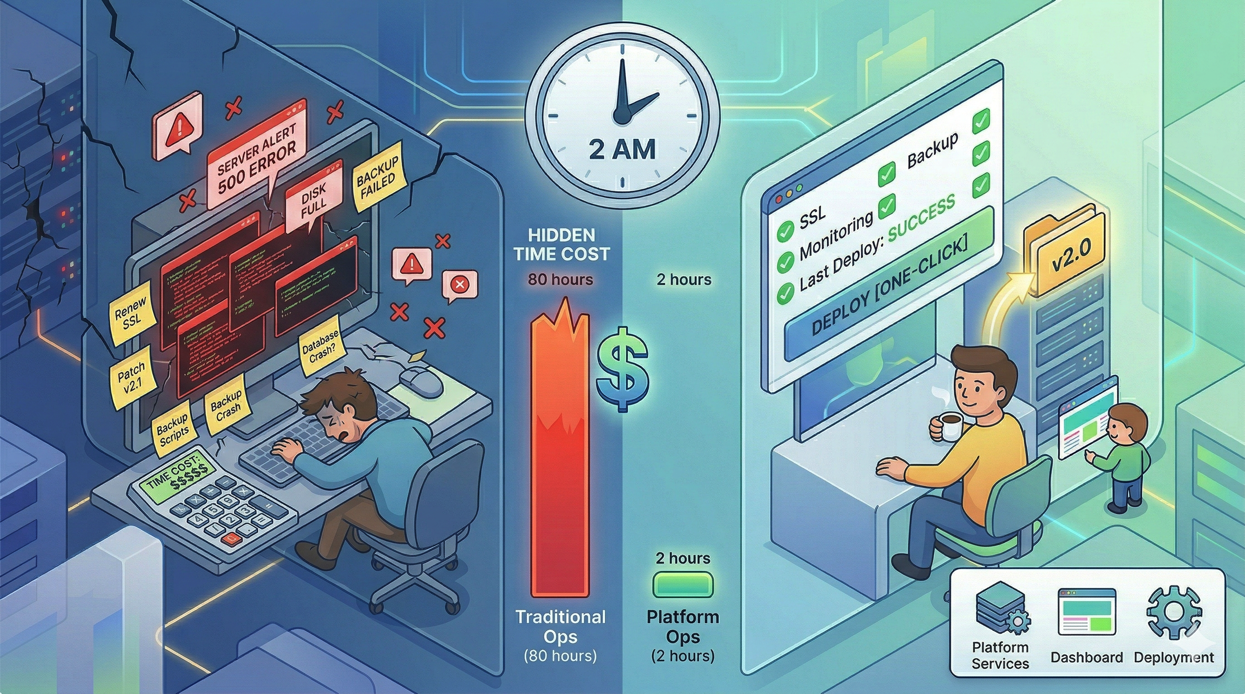
When something goes wrong at 2 AM, the cost is not just the time to fix it — it is the disruption to your sleep, the cognitive overhead the next day, and the stress.
DIY:
Setting up monitoring: included in initial setup
Maintaining monitoring configuration: 1 hour/month
Investigating alerts (false positives and real issues): 2-4 hours/month
Incident response (real outages): 2-6 hours/incident, estimated 1-3 incidents/quarter
Monthly average: 4-8 hours ($300-600/month)
Deploynix: Real-time monitoring with health alerts built in. Monitoring configuration is automatic. Critical alerts are sent via email to the server owner.
Monthly: 1-2 hours reviewing dashboards and responding to alerts ($75-150/month)
The Incident Cost Multiplier
The costs above assume steady-state operations. But servers have incidents: disk fills up, a process crashes, a security vulnerability needs emergency patching, SSL renewal fails, a deployment goes wrong and needs rollback.
Each incident costs not just the time to resolve it, but:
Context switching cost: Pulling a developer off feature work to handle infrastructure has a 15-30 minute ramp-up cost on both ends.
User impact cost: Every minute of downtime potentially costs revenue, reputation, and user trust.
Stress cost: Firefighting infrastructure issues is the leading cause of developer burnout.
Conservative estimate for incident costs: $200-500/month averaged across the inevitable incidents that occur with DIY server management.
The Total Comparison
Monthly DIY Cost (Single Server)
Category | Monthly Cost |
|---|---|
VPS hosting | $50 |
Security updates | $300 |
SSL management | $37 |
Backup management | $112 |
Deployments (40/month) | $675 |
Monitoring & incidents | $500 |
Total | $1,674/month |
Monthly Deploynix Cost (Single Server)
Category | Monthly Cost |
|---|---|
VPS hosting | $50 |
Deploynix subscription | Varies by plan |
Security updates | $28 |
SSL management | $0 |
Backup management | $12 |
Deployments (40/month) | $112 |
Monitoring & incidents | $112 |
Total | $314/month + subscription |
Monthly savings: approximately $1,300 in developer time.
Over a year, that is $15,600 in time savings — time that can be spent building features, acquiring customers, or doing literally anything more valuable than configuring Nginx.
But I Enjoy Server Management
Some developers genuinely enjoy infrastructure work. That is valid, and there is nothing wrong with managing your own servers as a learning exercise or hobby. But there is a difference between choosing to spend time on infrastructure and being forced to spend time on it because you do not have a better option.
If server management is your core competency — if you are a DevOps engineer or SRE — then DIY makes sense because that is your job. But if you are a developer whose job is building a Laravel application, every hour on infrastructure is an hour stolen from your actual work.
The Team Scale Effect
The costs above assume a solo developer. For teams, the picture gets worse for DIY:
Knowledge silos: The developer who set up the server is the only one who knows how it is configured. If they are on vacation when something breaks, the team is stuck.
Inconsistency: Multiple developers making server changes leads to configuration drift. Staging diverges from production.
Access management: Adding and removing team members' SSH keys across multiple servers is manual and error-prone.
Deploynix addresses these through organization roles (Owner, Admin, Manager, Developer, Viewer), per-server SSH key management, and a consistent interface that any team member can use. When a team member leaves, remove their organization membership and audit SSH keys on each server they had access to as part of your offboarding process.
The Scale Inflection Point
At one server, the DIY approach is feasible (if expensive in hidden costs). At three servers, it becomes a significant burden. At ten servers, it is a full-time job.
The irony is that the companies most likely to manage their own servers (startups trying to save money) are the ones that can least afford the time cost. A startup with two developers spending 20% of their time on infrastructure is effectively a 1.6-person team building product.
What You Are Actually Paying For
When you pay for a deployment platform, you are not paying for the ability to SSH into a server. You are paying for:
Automation of repetitive tasks that eat hours every month
Encoded best practices from managing thousands of servers
Consistent, tested provisioning that eliminates configuration errors
Zero-downtime deployments that would take days to implement yourself
Integrated monitoring that works out of the box
Automated SSL management that never fails silently
Centralized access control that works across all servers
One-click rollback when deployments go wrong
API access (with Sanctum token authentication and granular scopes) for custom automation
Each of these represents hours of development and maintenance that you do not have to do.
Conclusion
The true cost of managing your own servers is not the VPS bill. It is the hundreds of hours per year spent on provisioning, security updates, SSL certificates, backup configuration, deployment scripts, monitoring setup, and incident response. At a conservative developer rate, this easily exceeds $15,000 per year for a single server — and the cost scales with every additional server.
A deployment platform like Deploynix costs a fraction of this and handles the infrastructure work so you can focus on building your application. The math is not close. Unless server management is your product, it is almost certainly not the best use of your time.
The next time someone says "I can do all that myself for free," ask them to track their time for a month. The number of hours they spend on server operations — time they could have spent building features — will make the case more convincingly than any pricing page ever could.