OPcache Configuration for Laravel: The Free Performance Boost You're Ignoring
OPcache is the single most impactful performance optimization you can make for a Laravel application, and the majority of production servers are either not using it at all or using it with suboptimal settings. Enabling and properly configuring OPcache typically delivers a 2x to 4x improvement in requests per second with zero code changes.
Deploynix enables OPcache on all provisioned servers by default. But "enabled" and "optimally configured" are different things. This guide explains what OPcache does, provides optimal settings for Laravel applications, covers the preloading feature, and addresses the cache invalidation challenges that trip up most developers.
What OPcache Actually Does
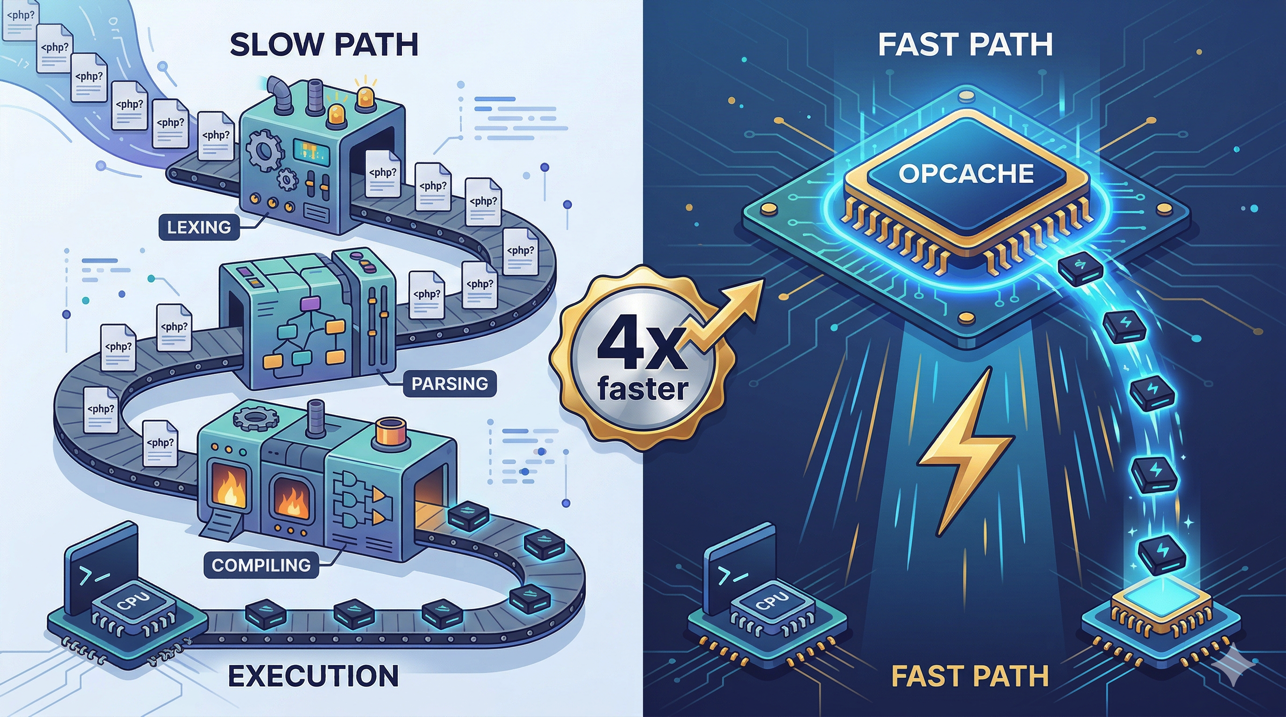
When PHP executes a script, it goes through four stages:
Lexing: The source code is broken into tokens
Parsing: Tokens are organized into an Abstract Syntax Tree (AST)
Compilation: The AST is compiled into opcodes (bytecode instructions for the PHP virtual machine)
Execution: The opcodes are executed by the Zend VM
Without OPcache, stages 1-3 happen on every single request, for every single PHP file your application loads. A typical Laravel request loads 200-400 PHP files (framework files, package files, your application code). That is 200-400 files being lexed, parsed, and compiled on every request.
OPcache caches the compiled opcodes in shared memory. After the first request compiles a file, subsequent requests skip stages 1-3 entirely and jump straight to execution. The compilation cost is paid once, not thousands of times per second.
This is why the performance improvement is so dramatic. For a Laravel application, compilation typically accounts for 50-75% of the total request processing time. Eliminating it doubles or quadruples your throughput.
Verifying OPcache Is Enabled
On your Deploynix-managed server, check OPcache status:
php -i | grep opcache.enableYou should see:
opcache.enable => On => On
opcache.enable_cli => Off => Off
OPcache should be enabled for FPM (opcache.enable = 1) but typically disabled for CLI (opcache.enable_cli = 0) since CLI scripts are short-lived and do not benefit from caching.
For more detailed status, create a temporary PHP file:
<?php
phpinfo();
Access it in your browser and search for the "Zend OPcache" section. It shows current memory usage, cache hit rates, and configuration.
Optimal OPcache Settings for Laravel
Here are the recommended settings with explanations:
; Enable OPcache
opcache.enable=1
opcache.enable_cli=0

; Memory allocation
opcache.memory_consumption=256
opcache.interned_strings_buffer=32

; Cache behavior
opcache.max_accelerated_files=20000
opcache.validate_timestamps=0
opcache.revalidate_freq=0

; Optimization level
opcache.optimization_level=0x7FFEBFFF

; Error handling
opcache.save_comments=1
opcache.fast_shutdown=1
Let us break down each setting.
opcache.memory_consumption
Default: 128 MB
Recommended: 256 MB
This is the total shared memory allocated for storing compiled opcodes. A typical Laravel application with several packages compiles to 50-100 MB of opcodes. Setting this to 256 MB gives ample room for the framework, packages, and your application code, plus headroom for growth.
If OPcache runs out of memory, it starts evicting cached scripts, which means those scripts get recompiled on the next request. This defeats the purpose. You can monitor cache usage:
php -r "var_dump(opcache_get_status()['memory_usage']);"If used_memory approaches total_memory, increase memory_consumption.
opcache.interned_strings_buffer
Default: 8 MB
Recommended: 32 MB
PHP interns (deduplicates) strings that appear frequently in source code — class names, method names, variable names, string literals. OPcache stores interned strings in a shared buffer so all workers share one copy instead of each worker keeping its own.
Laravel and its packages use thousands of unique strings. 32 MB is the default on Deploynix-managed servers and sufficient for most Laravel applications. If you run a very large application with many packages, you can increase this to 64 MB.
opcache.max_accelerated_files
Default: 2,000
Recommended: 20,000
The maximum number of PHP files that can be cached. Count your project's PHP files:
find /home/deploynix/your-site/current -name "*.php" | wc -lA Laravel application with several packages typically has 5,000-15,000 PHP files. Setting this to 20,000 ensures every file fits in the cache. PHP rounds this up internally to the nearest prime number.
If this limit is too low, some files are not cached and get recompiled on every request. There is no downside to setting it higher than your actual file count (it only wastes a small amount of memory for the hash table).
opcache.validate_timestamps
Default: 1 (enabled)
Recommended for production: 0 (disabled)
This is the most important production setting. When enabled, OPcache checks each file's modification timestamp on every request and recompiles files that have changed. When disabled, OPcache never checks for changes — it serves the cached version until PHP-FPM is restarted.
Why disable it: Checking file timestamps on 200-400 files per request generates hundreds of stat() system calls. On a busy server, this adds measurable overhead. More importantly, in production, your code does not change between deployments. There is no reason to check.
The catch: With validate_timestamps=0, deploying new code does not automatically take effect. You must restart PHP-FPM after each deployment to clear the OPcache and load the new code. Deploynix handles this automatically — every deployment restarts PHP-FPM as a standard step.
opcache.revalidate_freq
Default: 2 (seconds)
Recommended: 0
When validate_timestamps=1, this setting controls how often OPcache checks file timestamps. Setting it to 0 means "check on every request." Setting it to 60 means "check at most once per minute."
Since we recommend validate_timestamps=0 in production, this setting has no effect. Set it to 0 for development environments where timestamps are validated.
opcache.save_comments
Default: 1
Recommended: 1
Laravel requires PHP DocBlock comments for several features: route attribute annotations, dependency injection annotations, and some packages that use reflection to read comments. Disabling this saves a small amount of memory but breaks these features.
Always keep this enabled for Laravel applications.
OPcache Preloading
PHP 7.4 introduced OPcache preloading, and it has matured significantly through PHP 8.x. Preloading lets you specify a script that loads PHP files into OPcache when PHP-FPM starts, before any request is served.
How Preloading Differs from Regular Caching
Without preloading, OPcache populates lazily — a file is cached on its first access. The first request after a PHP-FPM restart (or after clearing the cache) is slow because it compiles hundreds of files. Subsequent requests are fast.
With preloading, all specified files are compiled and loaded into shared memory when PHP-FPM starts. The first request is already fast because the cache is pre-warmed.
Additionally, preloaded files benefit from deeper optimizations: PHP can inline constants, resolve class hierarchies, and eliminate dead code at startup time in ways that are not possible with lazy caching.
Configuring Preloading for Laravel
Laravel includes a preload script generator. Generate the preload file:
php artisan optimizeConfigure PHP-FPM to use it:
opcache.preload=/home/deploynix/your-site/current/preload.php
opcache.preload_user=deploynix
The preload_user must match the user PHP-FPM runs as on your Deploynix server.
What to Preload
The optimal preloading strategy for Laravel:
Framework core files: The Laravel framework classes loaded on every request
Frequently used package files: Classes from packages used in most requests
Your application's base classes: Models, middleware, service providers
Do not preload everything. Files that are rarely loaded (specific artisan commands, test files, migration files) waste shared memory if preloaded.
Preloading Caveats
Preloaded files cannot be updated without restarting PHP-FPM. This is the same constraint as validate_timestamps=0, and it is handled the same way — Deploynix restarts PHP-FPM on every deployment.
Preloading errors (a file that fails to compile) prevent PHP-FPM from starting. Always test your preload script before deploying it to production. If PHP-FPM fails to start after a deployment, the preload script is a likely culprit.
Cache Invalidation During Deployment
With validate_timestamps=0 and potentially preloading enabled, deploying new code requires clearing the OPcache. There are several approaches:
PHP-FPM Restart (Recommended)
The simplest and most reliable approach. Restarting PHP-FPM completely clears the OPcache and reloads all files from the new deployment.
systemctl reload php8.4-fpmNote: reload (graceful) is preferred over restart (abrupt). A reload finishes processing current requests with the old code, then starts new workers with the new code. This provides zero-downtime cache invalidation.
Deploynix uses graceful reload during deployments, ensuring no requests are dropped.
opcache_reset() Function
You can call opcache_reset() from a PHP script to clear the cache without restarting PHP-FPM:
opcache_reset();This must be called from a web request (not CLI) because FPM and CLI have separate OPcache instances. Some deployment tools hit a special endpoint that calls this function. This approach works but is less reliable than a PHP-FPM restart because it requires the web server to be accessible during deployment.
cachetool
The cachetool CLI utility can interact with OPcache through the PHP-FPM socket:
cachetool opcache:reset --fcgi=/var/run/php/php8.4-fpm.sockThis is useful for automation but adds a dependency. Since Deploynix handles PHP-FPM restarts automatically, cachetool is rarely needed.
Monitoring OPcache Performance
Cache Hit Rate
The single most important OPcache metric is the hit rate:
$status = opcache_get_status();
$hits = $status['opcache_statistics']['hits'];
$misses = $status['opcache_statistics']['misses'];
$hitRate = $hits / ($hits + $misses) * 100;
A healthy OPcache shows a hit rate above 99%. If your hit rate is below 95%, something is wrong:
OPcache memory is too small (files are being evicted)
max_accelerated_filesis too lowFrequent PHP-FPM restarts are clearing the cache
Memory Usage
$status = opcache_get_status();
$memory = $status['memory_usage'];
echo "Used: " . round($memory['used_memory'] / 1024 / 1024) . " MB\n";
echo "Free: " . round($memory['free_memory'] / 1024 / 1024) . " MB\n";
echo "Wasted: " . round($memory['wasted_memory'] / 1024 / 1024) . " MB\n";
Wasted memory accumulates when files are recompiled (due to changes or cache invalidation) and the old compiled version cannot be freed until a restart. If wasted memory grows significantly, set opcache.max_wasted_percentage to trigger automatic restarts.
Cached File Count
$status = opcache_get_status();
echo "Cached scripts: " . $status['opcache_statistics']['num_cached_scripts'] . "\n";
echo "Max cacheable: " . $status['opcache_statistics']['max_cached_keys'] . "\n";
If num_cached_scripts approaches max_cached_keys, increase max_accelerated_files.
Benchmarks: Before and After OPcache Tuning
On a Deploynix-managed Hetzner server (2 vCPU, 4 GB RAM) running a Laravel 12 application:
OPcache Disabled
Metric | Value |
|---|---|
Requests/sec | 95 |
Avg response time | 105ms |
P99 response time | 320ms |
CPU usage | 92% |
OPcache Enabled (Default Settings)
Metric | Value |
|---|---|
Requests/sec | 285 |
Avg response time | 35ms |
P99 response time | 95ms |
CPU usage | 68% |
OPcache Optimized (Settings from This Guide)
Metric | Value |
|---|---|
Requests/sec | 340 |
Avg response time | 29ms |
P99 response time | 72ms |
CPU usage | 61% |
OPcache Optimized + Preloading
Metric | Value |
|---|---|
Requests/sec | 385 |
Avg response time | 26ms |
P99 response time | 58ms |
CPU usage | 55% |
The progression is striking: from 95 requests/second without OPcache to 385 with optimized OPcache and preloading — a 4x improvement. CPU usage drops by nearly 40%, leaving more headroom for database queries and application logic.
Common Mistakes
Running with validate_timestamps=1 in Production
This is the most common OPcache misconfiguration. The overhead of checking 200-400 file timestamps per request is significant, and it provides no benefit in production where code only changes during deployments.
Setting memory_consumption Too Low
If OPcache cannot fit all your files, it evicts old entries and recompiles them later. This creates a thrashing pattern where the cache never stabilizes. Set memory_consumption high enough that all files fit comfortably.
Forgetting to Restart PHP-FPM After Deployment
With validate_timestamps=0, deployed code is invisible until the cache is cleared. Deploynix handles this automatically, but if you deploy manually or use custom scripts, ensure PHP-FPM restart is part of the process.
Enabling OPcache for CLI
CLI scripts (artisan commands, cron jobs, queue workers) have separate OPcache instances that do not benefit from the shared FPM cache. For short-lived CLI scripts, OPcache adds overhead without benefit. For long-running workers, OPcache helps — but workers should have their own OPcache configuration separate from FPM.
Keep opcache.enable_cli=0 unless you have measured a benefit for your specific CLI workload.
OPcache and Laravel Octane
If you use Laravel Octane with FrankenPHP, Swoole, or RoadRunner (all supported by Deploynix), OPcache's role changes slightly. Octane keeps the application in memory across requests, so the compilation savings of OPcache are less dramatic — the application is compiled once when the Octane server starts.
However, OPcache still provides benefits with Octane:
Faster server startup (preloaded files are ready immediately)
Better memory efficiency (interned strings are shared)
JIT compilation (which runs on top of OPcache) still provides CPU-intensive operation speedups
The OPcache settings in this guide are compatible with Octane. You do not need different OPcache configuration for Octane versus traditional PHP-FPM.
Conclusion
OPcache is not optional for production Laravel applications. It is the difference between an application that struggles under moderate load and one that handles the same load with resources to spare. The performance improvement is free — no code changes, no architectural decisions, no additional services.
Configure OPcache using the settings in this guide. Disable timestamp validation. Set generous memory limits. Consider preloading for additional gains. Monitor your hit rate to verify the cache is working. And let Deploynix handle the cache invalidation on every deployment.