Deploying Laravel Pennant Feature Flags: Rolling Out Changes Safely on Deploynix
Deploying new features to production is inherently risky. No matter how thoroughly you've tested, production has a way of surfacing issues that staging environments don't. A new checkout flow might work perfectly with test data but break with a specific payment gateway configuration. A redesigned dashboard might perform well with a few hundred records but crawl under the weight of a power user's 50,000 entries.
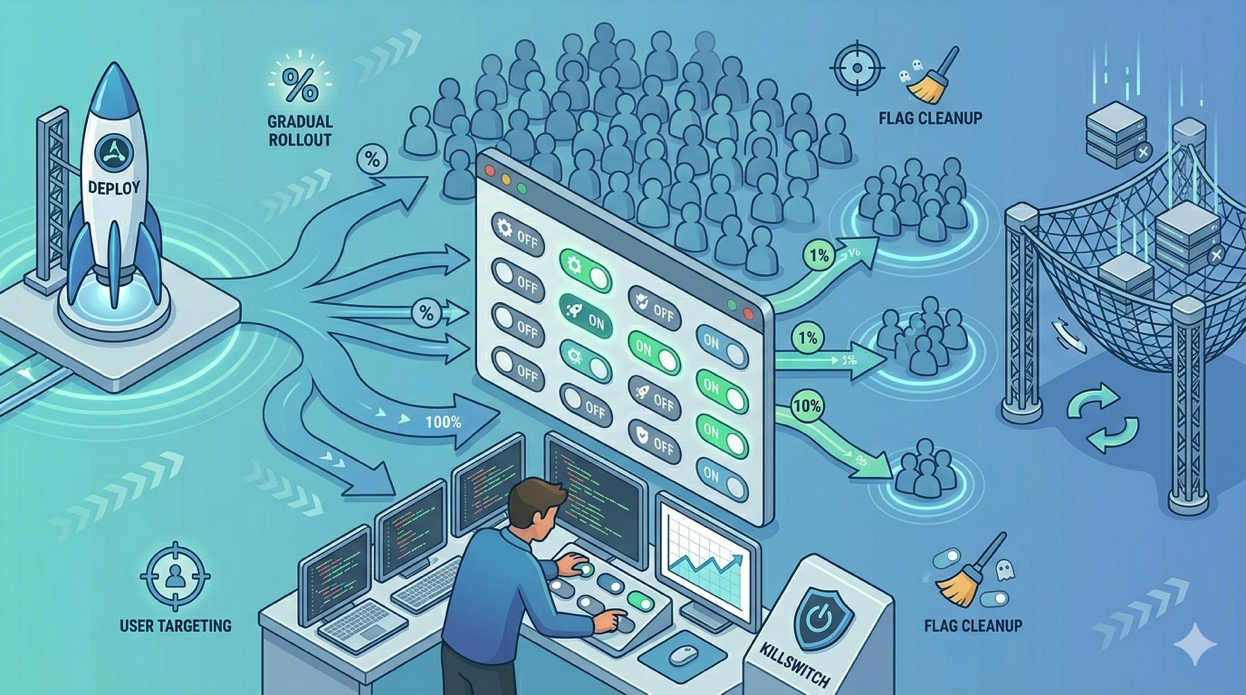
Feature flags decouple deployment from release. You deploy your code with the feature hidden behind a flag, then gradually enable it for a subset of users, monitor for issues, and either expand the rollout or kill it instantly without redeploying. Laravel Pennant is the official first-party package for feature flags in Laravel, and it integrates naturally with the framework's ecosystem.
This guide covers implementing Pennant for production deployments on Deploynix, from basic flag definitions through gradual rollouts, A/B testing, and the often-overlooked practice of cleaning up flags after they've served their purpose.
Why Feature Flags Matter for Production Deployments
Without feature flags, your deployment options are binary: the feature is live for everyone, or it's not deployed at all. This creates several problems:
Big-bang releases are risky. Deploying a major feature to 100% of users simultaneously means any issue affects every user. With feature flags, you can roll out to 1% of users, verify everything works, then scale up gradually.
Rollbacks are expensive. If a deployment introduces a bug, you need to revert the entire deployment, including any other changes that were part of it. With feature flags, you flip the flag off and the feature disappears instantly without touching your deployed code.
Long-lived feature branches cause merge conflicts. When a feature takes weeks to build, maintaining a separate branch becomes painful. Feature flags let you merge incomplete features into your main branch behind a flag, keeping your branch strategy clean.
Testing in production is undervalued. Staging environments never perfectly replicate production. Feature flags let you safely test with real data, real load, and real user behavior.
Setting Up Laravel Pennant
Installation
composer require laravel/pennant
php artisan vendor:publish --provider="Laravel\Pennant\PennantServiceProvider"
php artisan migrate
This creates the features table that Pennant uses to store feature flag state when using the database driver.
Defining Features
Pennant features are defined as classes. Create a new feature:
php artisan pennant:feature NewCheckoutFlowThis generates a feature class in app/Features/:
<?php

namespace App\Features;

use App\Models\User;
use Illuminate\Support\Lottery;

class NewCheckoutFlow
{
    public function resolve(User $user): mixed
    {
        return false;
    }
}
The resolve method determines whether the feature is active for a given user. This is where you define your rollout logic.
Simple Feature Definitions
For straightforward on/off flags:
class NewCheckoutFlow
{
    public function resolve(User $user): bool
    {
        return false; // Off for everyone by default
    }
}
Checking Features in Your Application
In PHP code:
use App\Features\NewCheckoutFlow;
use Laravel\Pennant\Feature;

if (Feature::active(NewCheckoutFlow::class)) {
    return view('checkout.new');
}

return view('checkout.current');
In Blade templates:
@feature(App\Features\NewCheckoutFlow::class)
    <x-new-checkout-form :cart="$cart" />
@else
    <x-current-checkout-form :cart="$cart" />
@endfeature
In middleware:
use Laravel\Pennant\Middleware\EnsureFeaturesAreActive;

Route::middleware([
    EnsureFeaturesAreActive::using('new-checkout-flow'),
])->group(function () {
    Route::get('/checkout/v2', [CheckoutController::class, 'showV2']);
});
Gradual Rollout Strategies
The real power of Pennant lies in gradual rollouts. Here are practical strategies for safely releasing features.
Percentage-Based Rollout
Roll out to a percentage of users using Laravel's Lottery:
use Illuminate\Support\Lottery;

class NewCheckoutFlow
{
    public function resolve(User $user): bool
    {
        return Lottery::odds(1, 10)->choose(); // 10% of users
    }
}
Important: Pennant stores the resolved value for each user in the database (when using the database driver). This means a user who gets the feature keeps it, and a user who doesn't won't get it on the next request. The lottery only runs once per user, ensuring a consistent experience.
To increase the rollout percentage, you need to purge the stored values and re-resolve:
php artisan pennant:purge NewCheckoutFlowThen update the percentage and let Pennant re-resolve for each user on their next request.
Organization-Based Rollout
For SaaS applications, you might want to roll out per organization rather than per individual user:
class NewCheckoutFlow
{
    public function resolve(User $user): bool
    {
        // Enable for specific organizations first
        return in_array($user->organization_id, [1, 5, 12]);
    }
}
Plan-Based Rollout
Enable features based on subscription tier:
class AdvancedAnalytics
{
    public function resolve(User $user): bool
    {
        return in_array($user->organization->plan, ['professional', 'enterprise']);
    }
}
This pattern works well with Deploynix's billing integration through Paddle. You can gate features behind specific subscription tiers (Free, Starter, Professional, Enterprise) using Pennant.
Internal-First Rollout
The safest rollout strategy is to enable features for your team first:
class NewCheckoutFlow
{
    public function resolve(User $user): bool
    {
        // Phase 1: Internal team only
        if ($user->isSuperAdmin()) {
            return true;
        }

        // Phase 2: Beta users
        if ($user->is_beta_tester) {
            return true;
        }

        // Phase 3: 10% of users
        // return Lottery::odds(1, 10)->choose();

        // Phase 4: Everyone
        // return true;

        return false;
    }
}
Progress through the phases by updating the resolve method and redeploying. Each phase lets you verify the feature works correctly before expanding the audience.
A/B Testing with Pennant
Pennant isn't limited to boolean values. You can return any value, enabling A/B testing and multivariate experiments.
Variant-Based Features
class CheckoutDesign
{
    public function resolve(User $user): string
    {
        return Lottery::odds(1, 3)
            ->winner(fn () => 'variant-a')
            ->loser(fn () => Lottery::odds(1, 2)
                ->winner(fn () => 'variant-b')
                ->loser(fn () => 'control')
                ->choose()
            )
            ->choose();
    }
}
This splits users into three groups: variant-a (33%), variant-b (33%), and control (34%).
Using Variants in Your Application
$variant = Feature::value(CheckoutDesign::class);

return match ($variant) {
    'variant-a' => view('checkout.variant-a', $data),
    'variant-b' => view('checkout.variant-b', $data),
    default => view('checkout.control', $data),
};
Tracking Results
To measure which variant performs better, track conversion events with the variant:
$variant = Feature::value(CheckoutDesign::class);

// When a conversion happens
analytics()->track('checkout_completed', [
    'variant' => $variant,
    'order_value' => $order->total,
    'user_id' => auth()->id(),
]);
Analyze the results in your analytics platform to determine which variant drives better outcomes.
Database vs. In-Memory Driver
Pennant supports two storage drivers: database and array (in-memory).
Database Driver
The database driver stores resolved feature values in the features table. This is the default and recommended driver for production.
Advantages:
Feature state persists across requests. A user sees the same feature state consistently.
You can query the database to see how many users have each feature enabled.
Feature state survives deployments and server restarts.
You can manually update feature state via the database.
Performance considerations:
Each feature check queries the database (though Pennant caches results within a single request).
For high-traffic applications, ensure the
featurestable is indexed properly (Pennant's migration handles this).If you check many features per request, consider eager-loading:
Feature::load([
    NewCheckoutFlow::class,
    AdvancedAnalytics::class,
    BetaDashboard::class,
]);
This loads all specified features in a single query rather than one query per feature.
In-Memory (Array) Driver
The array driver resolves features on every request without persisting the result.
When to use it:
During testing: Each test gets a fresh state.
For features that should be re-evaluated on every request (like maintenance mode).
For features based entirely on external factors (like time-of-day or server load).
In tests:
use Laravel\Pennant\Feature;

it('shows the new checkout when the feature is active', function () {
    Feature::define('new-checkout-flow', true);

    $response = $this->actingAs($user)->get('/checkout');

    $response->assertSee('New Checkout');
});
Managing Features on Deploynix
Feature State Across Deployments
When you deploy a new version of your application on Deploynix, Pennant's feature state persists in the database. This means:
A deployment doesn't change who has a feature enabled.
You can update feature logic (the
resolvemethod) in your code and deploy without affecting existing users' feature state.To re-evaluate features for all users after changing the resolve logic, purge and let Pennant re-resolve.
Artisan Commands for Feature Management
Pennant provides Artisan commands for managing features in production. Run these through Deploynix's web terminal or via SSH:
# Activate a feature for everyone
php artisan pennant:activate NewCheckoutFlow

# Deactivate a feature for everyone
php artisan pennant:deactivate NewCheckoutFlow

# Purge stored values (forces re-resolution on next check)
php artisan pennant:purge NewCheckoutFlow

# Purge all feature values
php artisan pennant:purge
Emergency Killswitch
One of the most valuable uses of feature flags is the ability to instantly disable a problematic feature without redeploying:
php artisan pennant:deactivate NewCheckoutFlowThis immediately disables the feature for all users. No deployment needed, no waiting for CI/CD, no risk of introducing other changes. The feature disappears in seconds.
On Deploynix, you can run this command through the web terminal for immediate access without needing SSH keys on your current device.
Monitoring Feature Rollouts
Track the impact of feature rollouts through Deploynix's monitoring:
Watch server CPU and memory during rollouts. A poorly performing feature increases resource usage.
Monitor response times. If they spike after enabling a feature for more users, the feature may need optimization.
Check error rates. New features may introduce exceptions that only manifest in production.
Cleaning Up Feature Flags
Feature flags are temporary by nature. A flag that exists forever becomes technical debt. Old flags clutter your codebase, make conditional logic harder to follow, and confuse new team members.
When to Clean Up
A feature flag should be removed when:
The feature has been active for all users for at least two weeks with no issues.
You've confirmed there's no need to roll back.
Any A/B test has concluded and a winner has been selected.
The Cleanup Process
1. Remove the feature check from your code. Replace all Feature::active() checks and @feature directives with the permanent behavior:
// Before
if (Feature::active(NewCheckoutFlow::class)) {
    return view('checkout.new');
}
return view('checkout.current');

// After
return view('checkout.new');
2. Delete the feature class. Remove app/Features/NewCheckoutFlow.php.
3. Remove old code paths. Delete the old checkout view, controller methods, or any code that only existed as the "else" branch of the feature flag.
4. Clean up the database. Purge the stored feature values:
php artisan pennant:purge NewCheckoutFlow5. Deploy the cleanup. Deploy the cleaned-up code through Deploynix. This is a low-risk deployment since you're removing a flag for a feature that's already fully rolled out.
Enforcing Cleanup
To prevent flag accumulation, adopt a team practice:
Every feature flag gets a "cleanup by" date when it's created (add it as a comment in the feature class).
Review feature flags monthly. Any flag past its cleanup date gets prioritized.
Track active feature flags in your project management tool.
class NewCheckoutFlow
{
    /**
     * Cleanup by: 2026-05-01
     * Owner: @sameh
     * Purpose: New checkout flow with improved UX
     */
    public function resolve(User $user): bool
    {
        return Lottery::odds(1, 10)->choose();
    }
}
Best Practices Summary
Start with internal users. Always enable features for your team first before any external rollout.
Use percentage-based rollouts. Go from 1% to 10% to 50% to 100%, monitoring at each step.
Monitor during rollouts. Watch server resources and error rates through Deploynix's dashboard.
Keep the killswitch ready. Know how to run
pennant:deactivatequickly through Deploynix's web terminal.Use the database driver in production. Consistent feature state across requests is essential for user experience.
Eager-load features. If you check multiple features per request, load them all in one query.
Clean up promptly. Remove feature flags within two weeks of full rollout.
Document your flags. Every flag should have an owner, purpose, and cleanup date.
Conclusion
Feature flags transform deployment from a high-stakes event into a routine operation. With Laravel Pennant on Deploynix, you deploy code with confidence knowing that any new feature can be enabled gradually, monitored closely, and rolled back instantly if problems arise.
The combination is powerful: Deploynix handles zero-downtime deployments and infrastructure management, while Pennant handles the application-level control of which users see which features. Together, they give you a deployment workflow where shipping new code is no longer something that keeps you up at night.
Start with a single feature flag on your next release. Experience the peace of mind that comes from knowing you can control the rollout after deployment. Once you've tasted that control, you'll wonder how you ever deployed without it.