Custom Health Check Endpoints for Laravel: Beyond 200 OK

Every Laravel application ships with a default route that returns a 200 OK response. It tells you the web server is running. It tells you PHP is alive. And it tells you absolutely nothing about whether your application is actually healthy.
A returning customer can't complete checkout if your Redis connection dropped. Your API consumers get cryptic 500 errors when the database connection pool is exhausted. Your queue workers silently stopped processing jobs three hours ago, and nobody noticed because your uptime monitor keeps reporting "all clear."
Sound familiar? The problem is that most health checks are superficial. They verify the application process is running without confirming the application is actually working. In this post, we'll build a comprehensive health check endpoint that validates every critical dependency your Laravel application relies on — and integrate it with Deploynix's monitoring to get alerts before your users notice problems.
Why a Simple 200 OK Isn't Enough
A basic health check route like this is dangerously misleading:
Route::get('/health', fn () => response('OK', 200));This route will return 200 even when your database is down, your cache server is unreachable, your queue workers have crashed, your disk is 99% full, and your payment gateway API is timing out.
A proper health check should verify the entire dependency chain your application needs to function correctly. When any critical component fails, your monitoring system should know about it immediately — not when a customer opens a support ticket.
Designing Your Health Check Architecture
Before writing code, think about what "healthy" means for your specific application. Most Laravel applications depend on some combination of database connectivity, cache availability, queue processing, filesystem access, and external API reachability.
We'll build a health check system with two tiers: a lightweight liveness probe that confirms the application process is running, and a comprehensive readiness probe that validates all dependencies.
// routes/api.php

Route::get('/health/live', [HealthCheckController::class, 'liveness']);
Route::get('/health/ready', [HealthCheckController::class, 'readiness']);
The liveness endpoint stays simple and fast. Load balancers and container orchestrators use it to determine if the process should be restarted. The readiness endpoint does the heavy lifting.
Building the Health Check Controller
Start by generating a controller dedicated to health checks:
<?php

namespace App\Http\Controllers\Api;

use App\Http\Controllers\Controller;
use Illuminate\Http\JsonResponse;
use Illuminate\Support\Facades\Cache;
use Illuminate\Support\Facades\DB;
use Illuminate\Support\Facades\Queue;
use Illuminate\Support\Facades\Storage;

class HealthCheckController extends Controller
{
    public function liveness(): JsonResponse
    {
        return response()->json([
            'status' => 'alive',
            'timestamp' => now()->toIso8601String(),
        ]);
    }

    public function readiness(): JsonResponse
    {
        $checks = [
            'database' => $this->checkDatabase(),
            'cache' => $this->checkCache(),
            'queue' => $this->checkQueue(),
            'storage' => $this->checkStorage(),
            'disk_space' => $this->checkDiskSpace(),
        ];

        $healthy = collect($checks)->every(fn ($check) => $check['status'] === 'ok');

        return response()->json([
            'status' => $healthy ? 'healthy' : 'degraded',
            'timestamp' => now()->toIso8601String(),
            'checks' => $checks,
        ], $healthy ? 200 : 503);
    }
}
Returning a 503 status when any check fails is important. Monitoring tools, load balancers, and Deploynix's health alert system all use the HTTP status code to determine application state. A 200 with a "degraded" message in the body might get overlooked.
Checking Database Connectivity
The database check should go beyond simply opening a connection. Verify you can actually execute a query:
private function checkDatabase(): array
{
    try {
        $start = microtime(true);
        DB::connection()->getPdo();
        DB::select('SELECT 1');
        $latency = round((microtime(true) - $start) * 1000, 2);

        return [
            'status' => $latency > 500 ? 'degraded' : 'ok',
            'latency_ms' => $latency,
            'connection' => config('database.default'),
        ];
    } catch (\Throwable $e) {
        return [
            'status' => 'failed',
            'error' => $e->getMessage(),
        ];
    }
}
Notice we're measuring latency too. A database that responds in 800ms is technically reachable but practically failing under load. Flagging high-latency responses as "degraded" gives you an early warning before things break entirely.
Validating Cache Availability
Cache failures are insidious. Your application might keep running, but response times spike dramatically as every cache miss falls through to the database:
private function checkCache(): array
{
    try {
        $start = microtime(true);
        $key = 'health_check_' . uniqid();

        Cache::put($key, 'test_value', 10);
        $retrieved = Cache::get($key);
        Cache::forget($key);

        $latency = round((microtime(true) - $start) * 1000, 2);

        if ($retrieved !== 'test_value') {
            return [
                'status' => 'failed',
                'error' => 'Cache read/write mismatch',
            ];
        }

        return [
            'status' => 'ok',
            'latency_ms' => $latency,
            'driver' => config('cache.default'),
        ];
    } catch (\Throwable $e) {
        return [
            'status' => 'failed',
            'error' => $e->getMessage(),
        ];
    }
}
This performs a full write-read-delete cycle. It catches scenarios where your Valkey (Redis-compatible) server accepts connections but has run out of memory and is silently dropping writes.
Monitoring Queue Health
Queue failures are the hardest to detect because they're asynchronous by nature. A check that simply verifies the queue connection exists isn't sufficient — you need to know if jobs are actually being processed:
private function checkQueue(): array
{
    try {
        $connection = config('queue.default');

        if ($connection === 'sync') {
            return ['status' => 'ok', 'driver' => 'sync'];
        }

        $start = microtime(true);
        $size = Queue::size();
        $latency = round((microtime(true) - $start) * 1000, 2);

        $status = 'ok';
        if ($size > 1000) {
            $status = 'degraded';
        }

        return [
            'status' => $status,
            'latency_ms' => $latency,
            'queue_size' => $size,
            'driver' => $connection,
        ];
    } catch (\Throwable $e) {
        return [
            'status' => 'failed',
            'error' => $e->getMessage(),
        ];
    }
}
A large queue size often signals that workers have stopped processing or can't keep up with incoming jobs. Pair this with a scheduled job that writes a timestamp to the cache, then check that timestamp from the health endpoint. If the timestamp is stale, workers are stuck.
Checking Disk Space
Running out of disk space causes cascading failures — logs can't write, file uploads fail, database operations halt:
private function checkDiskSpace(): array
{
    $path = storage_path();
    $totalBytes = disk_total_space($path);
    $freeBytes = disk_free_space($path);
    $usedPercentage = round((1 - ($freeBytes / $totalBytes)) * 100, 1);

    $status = 'ok';
    if ($usedPercentage > 90) {
        $status = 'critical';
    } elseif ($usedPercentage > 80) {
        $status = 'degraded';
    }

    return [
        'status' => $status,
        'used_percentage' => $usedPercentage,
        'free_gb' => round($freeBytes / 1073741824, 2),
        'total_gb' => round($totalBytes / 1073741824, 2),
    ];
}
On Deploynix-managed servers, disk space monitoring is built into the real-time monitoring dashboard. But having it in your application's health endpoint adds defense in depth — and lets you set application-specific thresholds.
Verifying External API Dependencies
If your application depends on external services like payment gateways, email providers, or third-party APIs, check those too:
private function checkExternalApis(): array
{
    $services = [
        'payment_gateway' => config('services.stripe.base_url', 'https://api.stripe.com'),
        'email_service' => config('services.postmark.base_url', 'https://api.postmarkapp.com'),
    ];

    $results = [];
    foreach ($services as $name => $url) {
        try {
            $start = microtime(true);
            $response = Http::timeout(5)->head($url);
            $latency = round((microtime(true) - $start) * 1000, 2);

            $results[$name] = [
                'status' => $response->successful() ? 'ok' : 'degraded',
                'latency_ms' => $latency,
                'http_status' => $response->status(),
            ];
        } catch (\Throwable $e) {
            $results[$name] = [
                'status' => 'failed',
                'error' => 'Connection timeout or refused',
            ];
        }
    }

    return $results;
}
Set aggressive timeouts here. The health check endpoint itself should respond quickly. If an external API takes more than 5 seconds to respond to a HEAD request, it's effectively down from your application's perspective.
Securing the Health Check Endpoint
Your readiness endpoint exposes detailed information about your infrastructure. Protect it. The liveness endpoint can remain public (load balancers need it), but the readiness endpoint should require authentication:
// routes/api.php
Route::get('/health/live', [HealthCheckController::class, 'liveness']);

Route::get('/health/ready', [HealthCheckController::class, 'readiness'])
    ->middleware('auth:sanctum');
Alternatively, use a shared secret via a query parameter or header for monitoring services that can't send bearer tokens:
public function readiness(Request $request): JsonResponse
{
    if ($request->header('X-Health-Token') !== config('app.health_check_token')) {
        return response()->json(['error' => 'Unauthorized'], 401);
    }

    // ... run checks
}
Integrating with Deploynix Monitoring
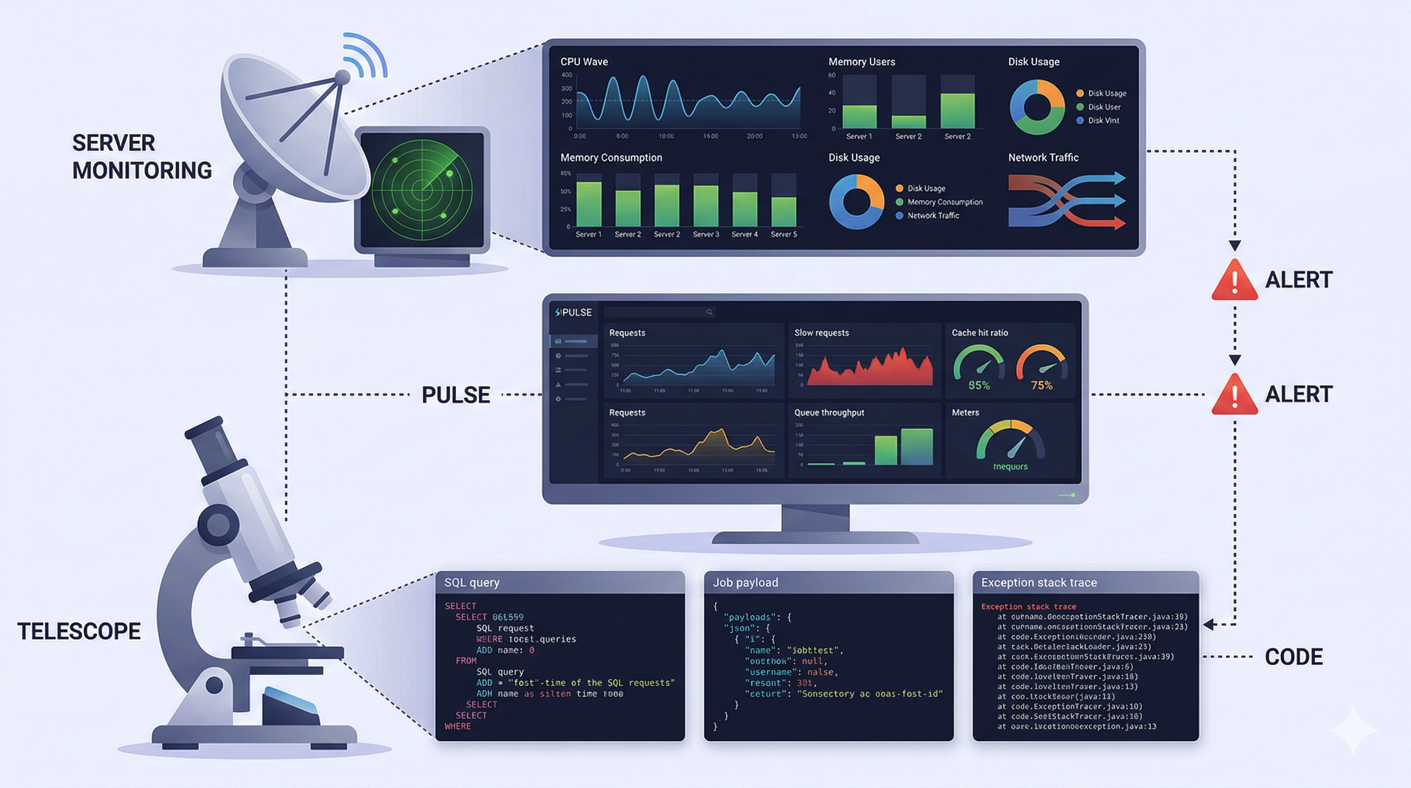
Deploynix provides built-in server-level health monitoring for CPU, memory, disk, and service status. Your custom health endpoint complements this by adding application-level visibility. Use an external uptime monitoring service (such as UptimeRobot, Better Uptime, or Oh Dear) to poll your health endpoint at regular intervals and alert you when it returns a 503.
Combined with Deploynix's built-in server monitoring and health alerts, you get full-stack visibility from the hardware layer up through the application layer.
The real power comes from combining these signals. A CPU spike on Deploynix's server monitoring combined with a "degraded" database latency from your health endpoint tells a clear story: your database queries are consuming too many resources and need optimization.
Caching Health Check Results
If your health endpoint gets hit frequently (every 10-30 seconds by monitoring services), the checks themselves can add load. Cache the results for a brief period:
public function readiness(): JsonResponse
{
    $result = Cache::remember('health_check_result', 15, function () {
        $checks = [
            'database' => $this->checkDatabase(),
            'cache' => $this->checkCache(),
            'queue' => $this->checkQueue(),
            'storage' => $this->checkStorage(),
            'disk_space' => $this->checkDiskSpace(),
        ];

        $healthy = collect($checks)->every(fn ($check) => $check['status'] === 'ok');

        return [
            'status' => $healthy ? 'healthy' : 'degraded',
            'checks' => $checks,
        ];
    });

    return response()->json([
        ...$result,
        'timestamp' => now()->toIso8601String(),
    ], $result['status'] === 'healthy' ? 200 : 503);
}
Be careful not to cache too aggressively. Fifteen seconds is a reasonable balance — frequent enough to catch real issues, infrequent enough to avoid unnecessary load.
A Complete Health Check Response
When everything works, your endpoint returns structured, actionable data:
{
    "status": "healthy",
    "timestamp": "2026-03-18T14:30:00+00:00",
    "checks": {
        "database": {
            "status": "ok",
            "latency_ms": 2.34,
            "connection": "mysql"
        },
        "cache": {
            "status": "ok",
            "latency_ms": 0.89,
            "driver": "redis"
        },
        "queue": {
            "status": "ok",
            "latency_ms": 1.12,
            "queue_size": 3,
            "driver": "redis"
        },
        "storage": {
            "status": "ok"
        },
        "disk_space": {
            "status": "ok",
            "used_percentage": 42.3,
            "free_gb": 28.84,
            "total_gb": 49.99
        }
    }
}
When something fails, it's immediately obvious what went wrong and where to investigate.
Conclusion
A health check that only returns 200 OK is a false sense of security. By validating every critical dependency — database, cache, queue, disk, and external services — you shift from reactive incident response to proactive monitoring.
Build your health endpoint early, integrate it with Deploynix's monitoring and alerting, and you'll catch failures before they reach your users. The thirty minutes it takes to implement a proper health check system will save you hours of debugging in production.
Your monitoring is only as good as the signals it receives. Stop sending it empty calories with a bare 200 OK, and start feeding it the data it needs to keep your application running.