Your Deploy Pipeline Is an Attack Surface
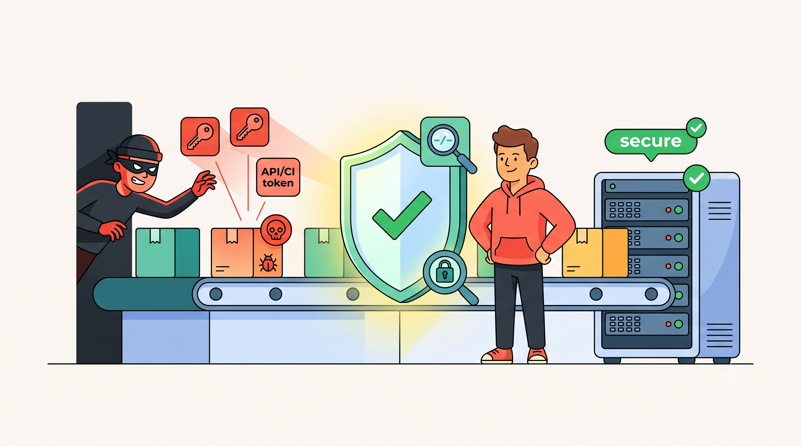
In May 2026, the Laravel ecosystem got its wake-up call. According to a report from The Hacker News, more than 700 versions of Laravel-Lang packages were compromised and republished carrying a credential stealer. The malicious code targeted exactly what you'd expect a professional operation to target: cloud provider keys, CI/CD tokens, and SSH keys. And it executed through the most mundane command in a PHP developer's day, a Composer install.
Laravel-Lang isn't an obscure dependency. It's the de facto standard for localized validation messages, pulled into countless Laravel projects, often as a transitive dependency nobody consciously chose. If your pipeline installed a poisoned version, the malware didn't need to break into anything. Your own build ran it, with your own credentials sitting in the environment.
This post is a hardening guide. We'll walk through what happened, why deploy pipelines are such a valuable target, and the concrete Composer, secrets, and access-control changes that shrink your exposure to the next one. Because there will be a next one.
What Actually Happened With Laravel-Lang
The chain was depressingly simple:
Someone with publish rights was the way in. The typical entry point in attacks like this is a compromised maintainer account: not the code, not Packagist itself, just one set of credentials belonging to someone who can publish.
Poisoned versions were published. Over 700 package versions across the Laravel-Lang ecosystem were republished with malicious code embedded, per The Hacker News report.
The code executed at install time. The payload ran through Composer's plugin and script auto-run behavior. No one had to call the malicious code. Installing the package was enough.
Credentials were exfiltrated. The stealer hunted for cloud keys, CI/CD tokens, and SSH keys, the exact material a build environment has to hold in order to do its job.
Notice what's missing from that chain: any vulnerability in your application. Your Laravel code could be flawless, your server patched, your firewall tight. None of it matters, because the attack came in through the front door, wearing the badge of a package you already trusted.
That's the uncomfortable lesson of supply-chain attacks. composer install is remote code execution that you invited. Usually the code it fetches is what you wanted. The entire security model rests on "usually."
Why Deploy Pipelines Are the Perfect Target
If you were writing a credential stealer, where would you want it to run? Not on a developer's laptop with a lock screen and half the secrets missing. You'd want the deploy pipeline, because the pipeline is where everything valuable converges:
Cloud provider keys. CI jobs that push to S3, invalidate CDN caches, or manage infrastructure carry API keys for AWS, DigitalOcean, Hetzner, and friends.
SSH keys. Something has to connect to your production servers. That something holds a private key, and it's usually the pipeline.
Git credentials. Deploy keys and access tokens that can read (and sometimes write) your source code.
Database credentials. Migrations run during deploys, which means the pipeline environment can reach your database with real credentials.
Third-party API keys. Stripe, Paddle, Mailgun, OpenAI. If your
.envis present at build time, it's all there.
And on top of that concentration of secrets, the pipeline has one more property attackers love: it runs code automatically, on a schedule or on every push, with no human watching the output scroll by. A malicious composer install on a developer machine might get noticed. The same install in CI at 2 a.m. gets a green checkmark.
Your deploy pipeline is a machine that holds all your keys and executes third-party code without supervision. Treat it with the same suspicion you'd apply to a public-facing endpoint, because functionally, that's what it is. Packagist is the input.
Hardening Composer
This is the core of the defense. Composer has grown real security controls over the past few major versions; most projects just never turn them on.
Turn Off Script Execution Where You Can
The single highest-impact flag is --no-scripts:
composer install --no-scripts --no-interaction --prefer-dist --no-dev --optimize-autoloaderWith --no-scripts, Composer skips all lifecycle scripts during the install. For a Laravel app that matters more than it sounds, because the default composer.json wires artisan into the install process:
"scripts": {
    "post-autoload-dump": [
        "Illuminate\\Foundation\\ComposerScripts::postAutoloadDump",
        "@php artisan package:discover --ansi"
    ]
}
That package:discover call boots your Laravel application on the build machine, which loads and executes code from your installed packages. If a dependency is poisoned, this is one of the moments its code gets to run with your pipeline's environment in scope.
What breaks when you skip scripts: package discovery doesn't run, so Laravel's package manifest goes stale. The fix is to run the step explicitly, as a separate, deliberate command after the install and after any audit checks have passed:
composer install --no-scripts --no-dev --prefer-dist --no-interaction
composer audit --locked --no-dev
php artisan package:discover --ansi
Be honest with yourself about what this buys you. It doesn't make a malicious package safe; a poisoned service provider will still execute the moment your app boots. What it does is reorder the pipeline so that nothing from a fresh install executes before your checks have run, and it strips out the install-time execution paths that stealers rely on for the smash-and-grab. Defense in depth, not a force field.
A few packages genuinely rely on their own plugin hooks to function (patch appliers, autoload tweakers, php-http/discovery). Test your build with --no-scripts in staging first, and document any step you have to re-add manually. On Deploynix, deployment hooks give you full control of the install command, so swapping the default for the hardened sequence above is a one-line edit to your deploy script.
Allowlist Composer Plugins Explicitly
Scripts come from your root composer.json, but plugins come from your dependencies, and plugins execute during Composer's own runtime. Since Composer 2.2, plugin execution is gated behind the allow-plugins config. In interactive mode Composer prompts you; in CI, an unconfigured plugin fails the build, which is exactly the behavior you want.
Make the allowlist explicit in composer.json rather than letting prompts accumulate answers over the years:
"config": {
    "allow-plugins": {
        "pestphp/pest-plugin": true,
        "php-http/discovery": false
    },
    "sort-packages": true
}
Two rules for maintaining it:
Default to
false. Only flip a plugin totruewhen you understand what it does and why the package can't work without it.Review the list in every PR that touches
composer.json. A newtrueentry inallow-pluginsis someone granting install-time code execution to a third party. That deserves at least the scrutiny you'd give a new middleware.
You can also pass the --no-plugins flag in CI jobs that only need composer audit or validation, so those jobs execute no plugin code at all.
Install From the Lockfile, Never Update on a Server
Your composer.lock file is a security control, not just a convenience. It pins every package, including transitives, to an exact version with a hash. Commit it, always, even for internal projects.
Then enforce one rule everywhere outside a developer machine: CI and servers run composer install, never composer update. An update resolves versions at run time, which means a package poisoned five minutes ago can walk straight into production. An install from a committed lockfile can only ever give you versions that a human put into a commit, versions that existed and were reviewed at a specific point in time.
Add validation so drift fails loudly:
composer validate --strict
composer install --no-scripts --no-dev --prefer-dist --no-interaction
composer validate --strict fails the build if the lockfile is out of sync with composer.json, which catches the classic "edited composer.json on the server" mistake before it becomes a habit. --prefer-dist pulls packaged archives rather than cloning source repositories, which is faster and keeps .git metadata out of your vendor directory.
The Laravel-Lang incident is the argument for this discipline in one sentence: a project installing from a lockfile pinned before the window couldn't have pulled a poisoned version; a project running unpinned updates during it easily could.
Run composer audit in Every Pipeline
Composer ships a built-in audit command that checks your installed packages against published security advisories:
composer audit --locked --no-dev--locked audits what's actually in your lockfile rather than what's currently installed, and --no-dev skips dev dependencies that never reach production. The command exits non-zero when it finds an advisory, so wiring it into CI is a two-line job:
security-audit:
  script:
    - composer audit --locked --no-dev
Be clear about what this catches: known compromises. During the window between a malicious publish and the advisory going out, composer audit is blind. That's not a reason to skip it. Advisories for incidents like Laravel-Lang land fast once discovered, and an audit step in the pipeline is the difference between finding out from your CI logs and finding out from your cloud provider's fraud team. Run it on every deploy and on a daily schedule against your main branch, so a quiet week doesn't mean a quiet audit.
Treat New Transitive Dependencies as Code Review
Every composer.lock diff in a pull request is a list of code you're about to execute in the most privileged environment you own. Review it like one:
Read the lock diff. A minor bump of a first-party package that drags in three brand-new transitive dependencies is worth thirty seconds of "what are these and who maintains them."
Prefer tight constraints for risky positions. Anything that runs at install time or in your build tooling deserves a pinned or narrowly-ranged constraint, not
^across major functionality changes.Use Dependabot or Renovate, but keep a human in the loop. Automated update PRs are great; automated merges of dependency updates are how poisoned versions ship themselves. Renovate's
minimumReleaseAgesetting is particularly useful here: requiring a release to be several days old before a PR is even opened means most compromised versions get caught and pulled by the ecosystem before your bot ever proposes them.
None of this is heavy process. It's five minutes per dependency PR, and it's the only point in the whole pipeline where a human actually looks at what's changing in vendor/.
Secrets Hygiene on the Server
Assume the stealer runs anyway. What does it get? That question should drive how you lay out secrets on the server, and the honest answer for most Laravel apps is "everything, because it's all in one .env file readable by the same user that runs Composer."
Practical steps, in order of impact:
Make every credential least-privilege. Your
DB_USERNAMEshould not beroot. It should be an application user with privileges on the application database and nothing else: noGRANT, noSUPER, no access to other schemas. A stolen app credential that can read one database is an incident; a stolen root credential is a company-ending event on a bad day.Scope third-party API tokens. Most providers support restricted tokens now. A Stripe restricted key, an S3 key limited to one bucket with no
s3:DeleteObject, a DigitalOcean token scoped to read-only where write isn't needed. Every scope you don't grant is blast radius you don't have.Keep production secrets out of build environments entirely. Your CI job that runs
composer installandnpm run builddoes not needDB_PASSWORDorSTRIPE_SECRET. If your pipeline copies the full.envinto the build stage "because it was easier," the Laravel-Lang stealer just thanked you.Encrypt what's at rest. Laravel's
php artisan env:encryptlets you keep an encrypted environment file in the repo and decrypt it only at release time on the target server. We covered the full setup in our guide to secrets management for Laravel, including key handling and rotation workflows.
The theme is the same everywhere: a credential stealer can only steal what's present and can only use what the credential permits. You control both.
Scoped Deploy Keys and Short-Lived Tokens
Access credentials for the pipeline itself deserve the same least-privilege treatment as application secrets.
Repo deploy keys should be read-only. A deploy key exists so a server can clone your code. It does not need push access, and on GitHub, deploy keys are read-only unless you deliberately check the write box. Leave it unchecked. A stolen read-only key leaks your source; a stolen writable key lets an attacker commit a backdoor that your own pipeline will then deploy for them.
One SSH key per server, never shared. When every server has its own keypair, revocation is surgical: one compromised box means one key removed from authorized_keys and one deploy key deleted from the repo. When five servers share a key, revoking it is a coordinated outage. Per-server keys also make your audit logs meaningful, because you can tell which machine actually connected.
Short-lived CI tokens beat long-lived personal access tokens. A PAT created in 2024 and pasted into CI secrets is a skeleton key with no expiry and, usually, the full permissions of the human who made it. Modern CI platforms can do better: GitHub Actions can authenticate to cloud providers through OIDC, minting a token that lives for the duration of one job and dies with it. A stealer that grabs a token with a fifteen-minute lifetime has a fifteen-minute problem. One that grabs your two-year-old PAT has your account.
Rotate on a schedule, not just on incidents. Quarterly rotation of deploy keys and CI tokens is cheap insurance, and more importantly, it forces you to keep the rotation procedure documented and working. The worst time to discover nobody remembers how to rotate the deploy key is during an actual incident.
Reducing the Blast Radius
Separation is the strategy that makes every other control matter more. Two environments with half your secrets each are strictly better than one environment with all of them.
Separate CI credentials from production credentials. The build stage and the release stage are different trust zones. Build needs: repo read access, package registries, maybe an artifact store. Release needs: SSH to servers, and that's about it. When those are distinct credentials in distinct jobs, a compromise during composer install gets the build zone only. This maps naturally onto atomic deployment models, where the build happens in a fresh release directory and only a symlink swap touches production; we broke down that flow in The Anatomy of a Zero-Downtime Deploy.
Think about what each environment can reach. From your CI runner, can you connect to the production database? If yes, why? Most teams' answer is "migrations," and the better pattern is running migrations from the server during release rather than from CI across the internet. Every network path you close is a path the stealer can't use either.
Watch your egress. Exfiltration needs an outbound connection. Build machines and app servers typically have completely unrestricted outbound internet, which means stolen credentials leave silently. Full egress allowlisting is real work and often impractical for a small team, but even coarse measures help: outbound firewall rules on database servers (which have no business calling the internet), and alerting on unusual outbound destinations from app servers. Server-level monitoring that shows you resource and traffic anomalies, like the monitoring built into Deploynix, won't name the attacker, but a build server suddenly talking to an unfamiliar host during install is exactly the anomaly worth a look.
Keep staging honest. Staging environments often accumulate production credentials out of convenience: the real Stripe key "to test something," the production S3 bucket "temporarily." A stealer doesn't care which environment it runs in. If staging holds production secrets, staging is production, minus the hardening.
If You Installed a Compromised Version
Advisory lands, and your lockfile shows one of the poisoned versions. Here's the run book. Work top to bottom; the order matters because you must rotate the credentials that control other credentials first, or an attacker uses the parent to reissue the child while you're busy.
1. Contain first. Pin or remove the compromised package versions, redeploy from a clean lockfile, and freeze other deploys while you work.
2. Rotate in dependency order:
Tier 1: Accounts that mint credentials
  - Cloud provider root/IAM credentials and API tokens
  - Git hosting account credentials, 2FA recovery codes
  - CI/CD platform tokens and secrets store

Tier 2: Credentials those accounts issued
  - Deploy keys (all repos)
  - Server SSH keypairs
  - CI job tokens, webhook secrets

Tier 3: Application secrets (the whole .env)
  - Database passwords
  - APP_KEY (plan for re-encryption of encrypted data)
  - Mail, payment, storage, and third-party API keys
Rotate everything the compromised environment could read, not just what you can prove was taken. Stealers don't leave receipts.
3. Audit authorized_keys on every server. Line by line, on each box the pipeline could reach. Any key you can't positively attribute to a person or a specific server gets removed. Check ~/.ssh for every user account, not just the deploy user.
4. Review cloud audit logs. Pull the trail for the exposure window: API calls from unfamiliar IPs, newly created IAM users or access keys, changed security groups, new instances in regions you don't use. Attackers create their own credentials fast precisely so your rotation doesn't lock them out; look for what was created, not just what was used.
5. Check the Git side. New deploy keys, new webhooks, new OAuth app grants, recent commits and tags you don't recognize, changed CI workflow files. A modified pipeline definition is persistence, and it survives credential rotation.
6. Write it down. Which versions, which environments, what was rotated, what the logs showed. If customer data was reachable, your disclosure obligations may kick in, and a timeline built the same day beats one reconstructed a month later.
The 10-Point Pipeline Hardening Checklist
Print this one, or paste it into the team wiki:
composer.lockis committed, and every non-dev environment runscomposer install, nevercomposer update.CI installs use
--no-scripts, withpackage:discoverrun explicitly after checks pass.allow-pluginsis an explicit allowlist incomposer.json, defaulting tofalse, reviewed on every change.composer audit --lockedruns in every pipeline and daily on the main branch.Dependency update PRs get human review of the lock diff; no auto-merge, with a minimum release age on your update bot.
Build environments hold no production secrets. No
DB_PASSWORD, no payment keys, nothing production can't afford to leak.Every credential is least-privilege: non-root DB users, scoped API tokens, restricted cloud keys.
Deploy keys are read-only and per-server SSH keys are unique, so revocation is surgical.
CI-to-cloud auth uses short-lived tokens (OIDC where available) instead of long-lived PATs.
A rotation run book exists and has been tested, covering the full tiered order above.
Ten items, none of which require new tooling or budget. Most teams can close the whole list in an afternoon plus one staging test cycle.
What to Change This Week
The Laravel-Lang attack didn't exploit Laravel, or PHP, or a CVE in anything. It exploited the ecosystem's default posture of executing whatever the registry serves, delivered through Composer's install-time auto-run per the reporting on the incident, via what is typically the entry point in attacks like this: a compromised maintainer account. That posture is yours to change, at least for your own pipeline.
You won't get to zero risk. You will, with lockfile discipline, script and plugin controls, scoped credentials, and separated environments, get to a place where a poisoned package yields an attacker a read-only deploy key and a fifteen-minute token instead of the keys to your cloud account. That's the difference between a bad afternoon and a disclosure letter.
If you're rebuilding your deploy flow anyway, our production security checklist for 2026 covers the server-side half of this picture, and Deploynix gives you the scaffolding the pipeline half sits on: customizable deployment hooks for the hardened install sequence, atomic releases with one-click rollback when you need to back out a bad dependency fast, and server monitoring that surfaces the anomalies worth investigating. The supply chain is everyone's problem now. Your pipeline doesn't have to be the easy target in it.