Cloud Repatriation for Laravel: From AWS to a $10 VPS
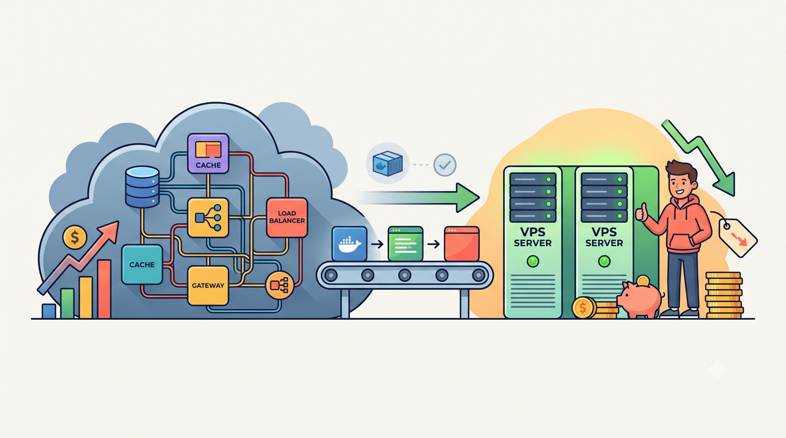
When 37signals announced they were leaving AWS back in 2023, a lot of people treated it as a stunt. DHH being DHH. Three years later, the receipts are in: roughly $2 million saved per year, on track for about $10 million over five years, and the stunt has become a trend with a name. Cloud repatriation.
This post is that trend translated for Laravel. Not the abstract "cloud vs on-prem" debate that enterprise architects have at conferences, but the specific question you're probably asking: my Laravel app runs on EC2 with RDS, ElastiCache, an ALB, and a NAT gateway, and the bill keeps creeping up. Would the same app run fine on one or two VPSes for a tenth of the cost? Usually, yes. Here's the evidence, the trade-offs, and the exact migration sequence.
Why repatriation stopped being contrarian
The numbers moved first, then the sentiment followed. A Barclays CIO survey found that 86% of CIOs plan to move at least some workloads back from public cloud, up from 43% in 2020. That's not a fringe position anymore. That's the majority.
The case studies got harder to dismiss too. 37signals is the loud one, but GEICO, an insurance company with genuinely serious infrastructure, cut per-core costs by roughly 50% by pulling workloads back in-house. When a regulated Fortune 500 insurer and a small software company reach the same conclusion from opposite ends of the market, the middle should pay attention.
The developer mood shifted alongside the finance numbers. A Hacker News thread from January 2026 titled "Kubernetes Was Overkill" hit the front page with a story that will sound familiar: a team of eight spending around 60 hours a week feeding a k8s cluster, who moved to Docker Compose on plain servers and got their week back. Laravel teams rarely run Kubernetes, but the underlying pattern is identical. Complexity you adopted for scale you don't have, billed monthly.
None of this means AWS is bad. It means AWS is priced for workloads most Laravel apps don't resemble. Let's look at where the money actually goes.
What does a Laravel app on AWS actually cost?
A "standard" AWS deployment for a production Laravel SaaS usually looks like this: one or two EC2 instances (or Fargate tasks) behind an Application Load Balancer, RDS MySQL with Multi-AZ enabled because the checkbox said "recommended," an ElastiCache Redis node for cache and queues, a NAT gateway so instances in private subnets can reach the internet, S3 for storage, and CloudWatch collecting logs.
Every one of those line items bills separately, and several bill in ways people consistently forget:
The ALB charges per hour just for existing, then again in "load balancer capacity units" based on traffic. It never sleeps, so it never stops billing.
The NAT gateway is the classic gotcha. Hourly charge plus a per-gigabyte processing charge on traffic in both directions. Your Composer installs, API calls, and S3 uploads from private subnets all flow through it, and it quietly becomes one of the larger items on small bills.
RDS Multi-AZ roughly doubles your database instance cost, because you're paying for a standby replica that does nothing except wait for a failover most teams never experience.
CloudWatch charges for log ingestion and retention. A chatty Laravel app shipping every request log to CloudWatch can generate a surprising bill for the privilege of storing logs you'll never read.
Egress deserves its own section, because it's the single most distorted price in cloud computing.
The egress tax
Data leaving AWS is billed at a rate that has no relationship to what bandwidth actually costs. Compare the overage pricing across providers, per Better Stack's DigitalOcean vs Hetzner comparison:
Provider | Egress overage per TB | Cost of 5 TB/month egress |
|---|---|---|
AWS | ~$90 | ~$450 |
DigitalOcean | $10 | $50 |
Hetzner | ~€1.19 | ~€5.95 |
That's not a typo. AWS charges roughly 75 times what Hetzner charges for the same gigabyte leaving the same kind of datacenter (treating euro and dollar as near parity). And both DigitalOcean and Hetzner bundle generous transfer allowances with each server before overage pricing even kicks in, so a typical Laravel SaaS on either provider pays nothing at all for egress.
If your app serves file downloads, media, exports, or a busy API, egress alone can justify the migration before you've compared a single compute price.
The compute gap
Compute pricing tells a similar story with smaller multiples. The same Better Stack comparison puts a 4 GB Hetzner cloud instance at around €7.99/month against $24/month for a 4 GB DigitalOcean droplet, and an on-demand AWS instance with comparable specs lands well above both once you add EBS storage and the surrounding services. I've broken down full stage-by-stage numbers in the real cost of running a Laravel SaaS if you want the line-item version.
The honest summary: for a modest production Laravel app, the AWS stack described above typically lands in the low-to-mid hundreds of dollars per month once egress, NAT, Multi-AZ, and CloudWatch are counted. The equivalent VPS stack lands at $20-40. Per month.
What do you actually give up by leaving AWS?
This is where repatriation posts usually get dishonest, so let's not. AWS sells real things. The question is whether your Laravel app uses them.
Managed RDS failover. This one's genuine. Multi-AZ RDS gives you automatic failover in about a minute with zero operational effort, and nothing on a $10 VPS replicates that exactly. But be honest about your current posture: a lot of teams pay the Multi-AZ premium while running a deploy process, DNS setup, or application architecture that can't survive a failover gracefully anyway. On a VPS, your equivalent is automated backups plus a tested restore procedure, which for most single-region SaaS apps means accepting that a catastrophic database server failure costs you some minutes of downtime and a restore, maybe once every few years. Many businesses will trade that for thousands of dollars a year. Some genuinely can't, and that's fine; see the "when not to repatriate" section.
IAM. Astonishingly powerful, and almost entirely unused by small teams. If your IAM setup is "one role with too many permissions that everything uses," you're not giving up much. On a VPS the equivalent surface is SSH keys, a firewall, and per-database credentials, which is a smaller and more comprehensible security model. Worth noting: the May 2026 Laravel-Lang supply-chain attack specifically targeted cloud keys and CI/CD tokens via compromised Composer packages, so a smaller credential footprint isn't just simpler, it's a smaller target.
Autoscaling. The headline cloud feature, and the least used in practice. Most Laravel SaaS traffic is boringly predictable: a daily curve, a weekly curve, growth measured in months. Autoscaling solves a problem shaped like "10x traffic in ten minutes," and if that's not your traffic shape, you're paying elastic prices for static load. On a VPS you buy headroom instead, and vertical scaling (resize, reboot, minutes of work) covers each growth step.
Compliance checkboxes. If enterprise procurement requires workloads inside AWS with specific attestations, that's a business constraint, not a technical one. No VPS math changes it.
Notice what's not on the list: deployment tooling, SSL, monitoring, queue workers, cron. None of that is an AWS feature. It's all reproducible on any server, which is exactly the layer a provisioning platform handles.
The repatriation architecture
Here's the shape that replaces the EC2 + RDS + ElastiCache + ALB stack for the overwhelming majority of Laravel apps:
Option A: one beefy VPS. Nginx, PHP-FPM, MySQL, Valkey, and Horizon on a single 8-16 GB Hetzner instance. This sounds like heresy to anyone trained on AWS reference architectures, but a single modern VPS has far more headroom than most people believe, and it removes an entire class of network latency and configuration between your app, database, and cache.
Option B: app server + database server. Same stack, split across two instances: the app server runs Nginx, PHP-FPM, Horizon, and Valkey; the database server runs MySQL alone with its own RAM budget. This buys you independent scaling, a database that survives app-server rebuilds, and cleaner resource isolation for maybe $15-25/month extra. It's my default recommendation for anything with paying customers.
Either way, this is precisely the setup Deploynix provisions: pick Hetzner (or DigitalOcean, Vultr, Linode, or bring your own box over SSH), choose the server type, and it configures Nginx, PHP-FPM, MySQL with automated backups, firewall rules, Supervisor-managed Horizon workers, cron, and Let's Encrypt SSL. The Hetzner + Deploynix combination is the specific pairing I'd reach for on cost grounds.
What about S3? Keep it, or don't. Object storage is the one AWS service where staying put is defensible: S3 itself is cheap, and Laravel's filesystem abstraction means the app doesn't care. But if your S3 egress is meaningful (users downloading files), Cloudflare R2 or Backblaze B2 speak the S3 API, so the migration is usually a new disk in config/filesystems.php, a bucket sync, and R2 in particular charges nothing for egress:
'r2' => [
    'driver' => 's3',
    'key' => env('R2_ACCESS_KEY_ID'),
    'secret' => env('R2_SECRET_ACCESS_KEY'),
    'region' => 'auto',
    'bucket' => env('R2_BUCKET'),
    'endpoint' => env('R2_ENDPOINT'),
],
The migration playbook, step by step
The whole trick to a low-stress repatriation is refusing to do a big-bang cutover. You run both stacks in parallel, prove the new one works, and move traffic last. Budget two to three weeks of calendar time, most of it waiting, not working.
Step 1: Provision the target
Spin up the VPS (or pair) and let your provisioning tool build the stack: Nginx, PHP matching your production version, MySQL, Valkey, Supervisor. On Deploynix this is the connect-provider-and-click part; either way, resist the urge to hand-configure. You want this server reproducible, because the ability to rebuild it in minutes is your replacement for a chunk of AWS's managed-ness.
Step 2: Deploy the app in parallel
Point a deployment at the new server from the same Git repository and get a full release running against a copy of production data. Port your environment config carefully; this is the step where you discover the twelve .env values that only exist in the ECS task definition. Set up zero-downtime releases with symlink swaps from day one so the new stack's deploy story is already better than the old one.
Run the boring checklist: queues process, scheduled tasks fire, mail sends, uploads land in the right bucket, Horizon dashboard loads.
Step 3: Replicate the database
For small databases, a dump-and-restore during a maintenance window is fine and you can skip the replication ceremony:
mysqldump --single-transaction --routines --triggers \
  -h your-rds-endpoint.rds.amazonaws.com -u admin -p \
  your_database | gzip > dump.sql.gz
For anything where extended downtime hurts, set the VPS MySQL up as an external replica of RDS. Extend binlog retention on RDS first so the replica can catch up after the initial import:
CALL mysql.rds_set_configuration('binlog retention hours', 168);Then import a consistent snapshot on the VPS and start replication against the RDS endpoint. From that point the VPS database trails production by seconds, and your eventual cutover downtime shrinks to almost nothing.
Step 4: Shadow-test
Point a staging hostname at the new server and use it for real. Run your test suite against it. Have the team do their daily work through it for a few days. If you have synthetic monitoring or smoke tests, aim them here. What you're hunting for is environmental drift: a missing PHP extension, a locale difference, an outbound IP that a third-party API hasn't allowlisted. Every one of these is cheap to find now and expensive to find at 2 a.m. post-cutover.
Step 5: Drop the DNS TTL
Two days before cutover, lower the TTL on your app's DNS records to 60 seconds. This is the least glamorous and most important step in the playbook. A 24-hour TTL turns "roll back the cutover" from a one-minute action into a day of split traffic.
Step 6: Cut over
Pick a low-traffic window. One thing php artisan down does not do: it doesn't stop Horizon workers or the scheduler, which will happily keep processing jobs and writing to RDS after you promote the VPS, a recipe for split-brain writes. Stop them explicitly on the old stack first (disable Supervisor's autorestart before terminating, or just stop the program) and comment out the scheduler's cron entry there. The sequence:
# On the old stack
php artisan down --retry=60
supervisorctl stop horizon   # or disable autorestart, then: php artisan horizon:terminate
crontab -e                   # comment out the schedule:run entry

# On the VPS: confirm the replica has fully caught up before promoting
mysql -e "SHOW REPLICA STATUS\G"   # Seconds_Behind_Source must read 0

# On the VPS: stop replication, promote to primary
mysql -e "STOP REPLICA; RESET REPLICA ALL;"

# Point .env at the local database, then
php artisan config:cache
php artisan up
Flip DNS to the new server's IP. With a 60-second TTL, traffic moves over within a couple of minutes. Watch the logs, watch Horizon, watch your error tracker. Total downtime with the replication approach: under five minutes, most of it caution rather than necessity.
Step 7: Keep AWS warm, then kill it properly
Leave the old stack running but idle for two weeks. It's your rollback path, and it's also where you'll notice the stragglers: a webhook still pointed at the old ALB, a cron job that only runs monthly, an office IP allowlist. After two weeks of silence, decommission deliberately, because AWS keeps billing for things you forgot were separate: EBS volumes and snapshots, unattached Elastic IPs, the NAT gateway, the ALB itself. Terminating the EC2 instances alone does not stop the bleeding. Walk the bill line by line until it reads zero.
What if you're on Vapor?
The serverless pendulum is swinging back too, and I say that as someone who wanted it to work. Vapor's promise was Laravel without servers; the reality for many teams was cold starts, VPC-plus-NAT charges for database access, and a bill that scaled with success in unpredictable ways. I've written up the full accounting in the serverless hype vs reality for Laravel apps.
If you're on Vapor today, you have two exits. The official one is Laravel Cloud: there's a documented Vapor-to-Cloud migration path, and Cloud's June 2026 pricing update brought tiers from $5/month with scale-to-zero hibernation and spending caps. It's a genuinely reasonable landing spot if you want to stay fully managed and usage-priced.
The other exit is the one this post describes: a VPS, where the pricing model is a flat number you can recite from memory. Vapor apps migrate to servers more easily than people expect, since the codebase is still just Laravel. Queues move from SQS back to Redis with a config change, and the things Vapor abstracted (workers, cron, TLS) are exactly what server platforms automate anyway. If cost predictability was your reason for leaving, usage-priced serverless to usage-priced managed cloud is a smaller move than it looks; the VPS is the option that actually changes the model.
When you shouldn't repatriate
Repatriation is a tool, not a religion. Stay on AWS when:
Your traffic is genuinely elastic. If you routinely see 10x spikes on unpredictable schedules (ticketing, viral consumer apps, election-night dashboards), autoscaling is doing real work for you and a fixed-size VPS forces you to pay for peak capacity all month. That said, check your actual metrics before claiming this; almost everyone thinks their traffic is spikier than it is.
Compliance is welded to AWS services. If your SOC 2 scope, HIPAA BAA, or enterprise contracts name specific AWS services, migrating means re-auditing. Sometimes that's worth it. It's rarely worth it this quarter.
You're deeply coupled to AWS primitives. An app orchestrating Lambda fan-outs, Kinesis streams, and Textract jobs isn't a Laravel app on AWS, it's an AWS app with a Laravel frontend. Repatriate the parts that make sense, if any.
Nobody on the team will own servers. A managed panel removes most of the ops burden, but "most" isn't "all." Someone still needs to care when a disk-usage alert fires. If your team has zero appetite for that, at any tooling level, a fully managed platform is the honest choice.
A worked 12-month example
Take a modest SaaS: a few thousand users, one production app, a queue-heavy workload, 2 TB of monthly egress from file exports.
The AWS version of this stack (two small instances behind an ALB, Multi-AZ RDS, an ElastiCache node, a NAT gateway, CloudWatch, and that 2 TB of egress at ~$90/TB) reliably lands in the mid hundreds of dollars per month. I won't pretend to a precise total, because AWS bills never are, but the egress line alone is around $180/month and it's rarely the biggest item. Call it several thousand dollars a year, trending up.
The VPS version, priced concretely:
Item | Monthly cost |
|---|---|
Hetzner app server, 4 vCPU / 8 GB (Nginx, FPM, Horizon, Valkey) | ~€7.99-16 (source) |
Hetzner database server, 8-16 GB MySQL | ~€8-16 (estimate, based on Hetzner's cited 4 GB pricing) |
Deploynix Starter plan | $7 flat |
Egress (2 TB, within included allowance) | $0 |
Backups to S3-compatible storage | pennies per month |
Total | ~$30-40/month |
That's roughly $360-480 a year for the whole production footprint, management layer included, versus thousands on AWS for the same app serving the same users. The delta pays for a lot: a contractor security review, a year of every SaaS tool in your stack, or simply margin. And because both the servers and the Deploynix plan are flat-priced, the number in month twelve is the number in month one. No usage meter, no surprise NAT charges, no egress anxiety.
Where this leaves you
The repatriation trend isn't developers getting nostalgic for servers. It's the market repricing a decade of "nobody got fired for choosing AWS" now that 86% of CIOs have looked at the bill and companies like 37signals and GEICO have published what leaving actually saves.
For Laravel specifically, the trade is unusually favorable. The stack is simple (Nginx, PHP-FPM, MySQL, Redis-compatible cache, a queue worker), it runs beautifully on commodity VPSes, and the operational layer that used to require a sysadmin is now a $12/month platform subscription. The parallel-run playbook above takes the drama out of the move: provision, deploy, replicate, shadow-test, drop the TTL, cut over, keep AWS warm for two weeks.
If you want to test the thesis cheaply, that's what free tiers are for. Provision a Hetzner box through Deploynix's Free plan, deploy a copy of your app next to your AWS stack, and compare the two with your own traffic. The numbers in this post are persuasive. Yours will be decisive.